Hunter vs LazyApply
Hundreds of quick applications, or fewer, better ones you've checked? Two very different approaches.

Hunter and LazyApply both apply to jobs for you, with very different philosophies. LazyApply is a Chrome extension built for volume: its plans allow from 15 up to 1,500 applications a day. Hunter is a Windows app built for fit. It scores each job against your real experience, writes a resume for that job, and holds applications for your review until you decide to let it submit on its own. Pick LazyApply for sheer reach. Pick Hunter if you’d rather send fewer applications that actually match.
Facts about LazyApply come from its own website, checked October 29, 2026. Links are at the bottom.
At a glance
| Hunter | LazyApply | |
|---|---|---|
| What it is | Windows app | Chrome extension plus web dashboard |
| Submits applications for you | Yes, after you turn off practice mode | Yes |
| Review before sending | Yes, the Review queue | No review step described on its site |
| Resume per job | Written for each job from your experience bank | 1 to 20 saved resume profiles, by plan |
| Daily volume | A daily limit you set | 15, 150 or 1,500 a day, by plan |
| Where it applies | Company career sites, plus LinkedIn Easy Apply or Indeed after you sign in | Names Greenhouse, Dice, Indeed and ZipRecruiter |
| Interview prep | Prep sheets and AI mock interviews | An interview answer generator |
| Price | Free during early access | $99, $149 or $999 a year |
Volume or fit?
LazyApply’s homepage says its agent “handles the entire application process” and can “apply to jobs across multiple platforms with a single click.” Its plans are sized by applications per day.
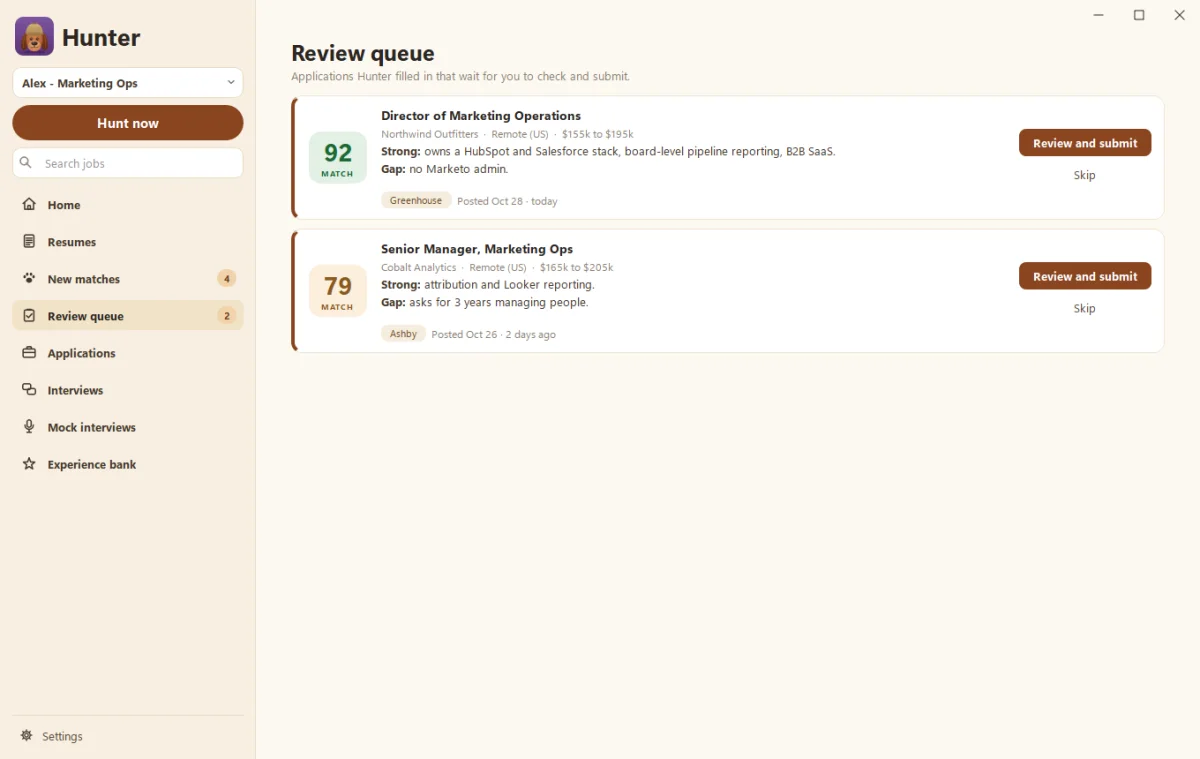
Hunter takes the slower road on purpose. Every job gets a match score with its strengths and gaps. Hunter only writes a resume when you ask for one, and that resume comes only from your experience bank. Any line it rewords is highlighted so you can check it. Then the application waits in the Review queue. Hunter starts in practice mode, so it never presses Submit on its own until you turn that off. Even then, a daily limit you set caps how many it sends.
Recruiters can tell a generic application from one written for the job. More on that in Tailored resumes and the fact check.
Price and refunds
LazyApply sells annual plans: Basic at $99 a year, Premium at $149 and Ultimate at $999. Each plan needs a Gmail address. Its refund policy covers the first subscription within 30 days, and only if you’ve applied to fewer than 100 jobs through the service.
Hunter is free during early access. It uses your own Claude or ChatGPT account for AI work like scoring and resume writing.
After you apply
Hunter connects to your Gmail and Google Calendar to spot replies and interviews, then builds a prep sheet for each interview and lets you practice with an AI interviewer. LazyApply offers an analytics dashboard, automated referral emails to employees at target companies, and an interview answer generator.
Where LazyApply wins
Pick LazyApply if:
- You want maximum reach and plan to apply widely.
- You use a Mac or Chromebook. Hunter is Windows only for now.
- You want referral emails sent to people at target companies.
- You don’t have a Claude or ChatGPT account and don’t want one.
Where Hunter wins
Pick Hunter if:
- You want to check before anything is sent. The Review queue and practice mode keep you in charge.
- You want a resume written for each job, from your real experience only.
- You want interview help, with prep sheets and mock interviews with a scorecard.
- You’d rather keep your data on your PC. Your profile, resumes and job history stay on your computer.
Getting started
Run your first hunt, then read Review and approve applications and set your daily auto-apply limit.
Sources
Checked October 29, 2026. Prices and features change, so check LazyApply’s site for the latest.
LazyApply is a trademark of its owner. Soggy Dog Studios isn’t affiliated with LazyApply. This comparison is based on public information as of the date above.
Questions people ask
Does LazyApply let me review applications before they're sent?
We didn't find a review step described on LazyApply's site. Its homepage says its agent handles the entire application process. Hunter starts in practice mode and holds applications in a Review queue until you approve them.
How much does LazyApply cost?
LazyApply lists annual plans of $99, $149 and $999 a year, with daily limits of 15, 150 and 1,500 applications, as of October 29, 2026. Hunter is free during early access.
Does Hunter work on a Mac?
Not yet. Hunter is a Windows app. LazyApply runs anywhere Chrome does.
Which one writes a different resume for each job?
Hunter writes a tailored resume for each job, only from your experience bank, and highlights every reworded line. LazyApply works from saved resume profiles, from 1 to 20 depending on the plan.
Still scratching your head?
Send us a note and a real person will get back to you.