Run your first hunt
How to start a job hunt in Hunter, where it looks, and how to read the New matches list it brings back.
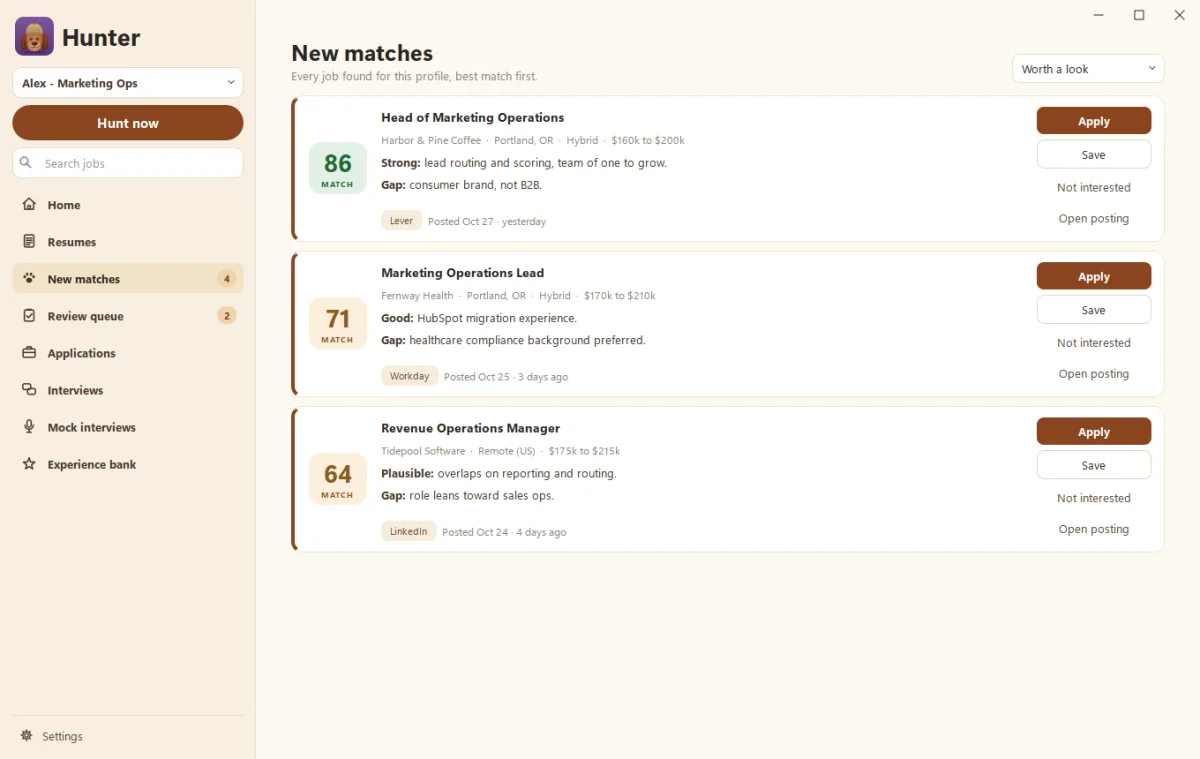
To run a hunt, click Hunt now in Hunter’s sidebar. Hunter searches company career sites and public job boards for the titles you set, merges duplicates, scores every job against your experience, and puts the results in New matches, best match first.
Before you start
Hunter needs three things, which setup asks for:
- Your experience bank. See Build your experience bank.
- At least one job title, plus the seniority, work style (remote, hybrid, onsite), locations and salary floor you want. Change these in Settings > Search.
- Claude or ChatGPT, to score matches. See Connect your Claude or ChatGPT account.
Where does Hunter look?
By default, everywhere it can:
- Company career sites on Greenhouse, Lever, Ashby, Workable, SmartRecruiters, Recruitee and Workday.
- Job boards: Remotive, RemoteOK, We Work Remotely, Hacker News “Who’s hiring”, The Muse, Arbeitnow, and LinkedIn and Indeed public job pages.
- USAJobs and Adzuna, if you add their free keys in Settings > Search.
- Your watch list: companies you name, whose career pages Hunter checks on every hunt.
Untick any source in Settings > Search under Sources.
How do I read New matches?
Every job shows its score, title, company, where Hunter found it and when it was first posted. Use the filter at the top to switch between Worth a look, All matches, Auto-apply level, Review level, Below review level and Saved. On each job you can:
- Apply: Hunter writes a tailored resume and fills in the application (see Review and approve applications).
- Save it for later.
- Click Not interested to clear it out.
Open a job to see the full posting, the strengths and gaps behind its score, and company facts like size and Glassdoor rating.
What happens after the first hunt?
Hunter keeps hunting on a schedule, at 7:00 AM and noon on weekdays unless you change it. See Hunt profiles and schedules. You get a short summary after each hunt, and great matches may be applied to automatically once you’re ready (see Turn off practice mode).
Questions people ask
How long does a hunt take?
Usually a few minutes, depending on how many sources and companies you've chosen. A bloodhound chases a squirrel on screen while you wait.
Does Hunter log in to LinkedIn or Indeed to search?
No. It only reads public job pages. You'd only sign in yourself later, if you choose to apply through one of those sites.
Still scratching your head?
Send us a note and a real person will get back to you.