Connect your Claude or ChatGPT account
How Fetch, Hunter and Kibble use the Claude or ChatGPT plan you already pay for, which plans work, and how to sign in.
All three apps use the Claude or ChatGPT plan you already have for their AI features. Claude needs a Pro or Max plan. ChatGPT needs Plus, Pro or Business. You sign in once in your browser, and the app never sees your password.
What does the AI do in each app?
- Fetch: turns your rough notes and the transcript into a summary, decisions and action items, and answers questions about past calls.
- Hunter: reads job posts, scores matches, writes tailored resumes, and plays the interviewer in mock interviews.
- Kibble: reads receipts in your email, fills in or fixes your budget, and answers questions about your money.
How do I connect?
The apps talk to Claude through Claude Code and to ChatGPT through Codex. These are free helper programs from Anthropic and OpenAI.
In Fetch and Hunter, the helper installs for you:
- Open the AI settings: Settings > AI notes in Fetch, Settings > AI in Hunter. (The setup guide asks too.)
- Pick Claude or ChatGPT.
- Click Sign in. If the helper isn’t on your PC yet, the app installs it from the official Anthropic or OpenAI source first.
- Finish signing in in the browser window that opens. If it shows a code, paste it into the app and click Submit code.
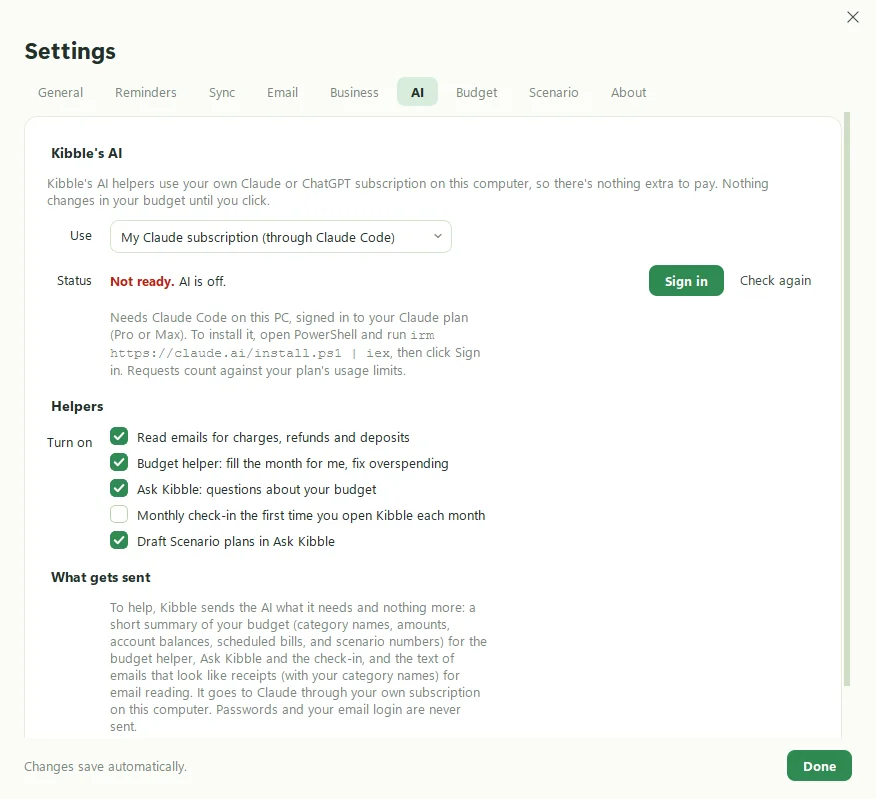
In Kibble, install the helper yourself first, then sign in:
- Claude: open PowerShell and run
irm https://claude.ai/install.ps1 | iex. - ChatGPT: install Codex from github.com/openai/codex, or run
npm install -g @openai/codex.
Then open Settings > AI, pick your plan, and click Sign in.
Do I have to sign in to every app?
Usually not. The helper is shared, so signing in once in Fetch also works for Hunter, and the other way around.
What gets sent to the AI?
Only text the feature needs: a meeting transcript and your notes, a job posting and your experience, or the emails Kibble thinks are receipts. Fetch never sends audio. ChatGPT is also locked down so it can only read the text it’s given. It can’t run commands or open files on your computer. More on our Security page.
It says “Didn’t work” or “Not signed in”
Click Test connection (in Fetch) or sign out and in again. If your plan has hit its usage limit for now, wait a bit and try again. Still stuck? See Getting help.
Questions people ask
Do I need an API key?
No. The apps use your regular Claude or ChatGPT subscription, the same one you use in the browser. Usage counts toward your plan's normal limits.
Does Soggy Dog see my AI conversations?
No. The apps talk to Claude or ChatGPT directly from your computer. Nothing passes through us.
Can I switch between Claude and ChatGPT?
Yes, any time, in each app's AI settings.
Still scratching your head?
Send us a note and a real person will get back to you.