First-time setup
What each app's setup guide asks the first time you open Fetch, Hunter or Kibble, and how to change your answers later.
The first time you open a Soggy Dog app, a setup guide walks you through the basics in a few minutes. A dog on the left explains each step (some say it’s the best part). Everything you choose can be changed later in Settings.
What does Fetch ask?
Fetch’s guide takes about 3 minutes:
- Where should your notes live? Pick a folder (Documents is the default) and whether to keep the audio of each call. You can also connect a Google Drive backup.
- Speech models. Fetch checks your computer and picks the best fit. See Choose a speech model.
- Connect your AI. Claude, ChatGPT, or Not now. See Connect Claude or ChatGPT to Fetch.
- Who do you meet with? Make folders for clients or projects, with optional trigger words.
- You’re all set. Choose whether Fetch starts with Windows and records calls automatically.
Speech models keep downloading in the background, so you can start using Fetch right away.
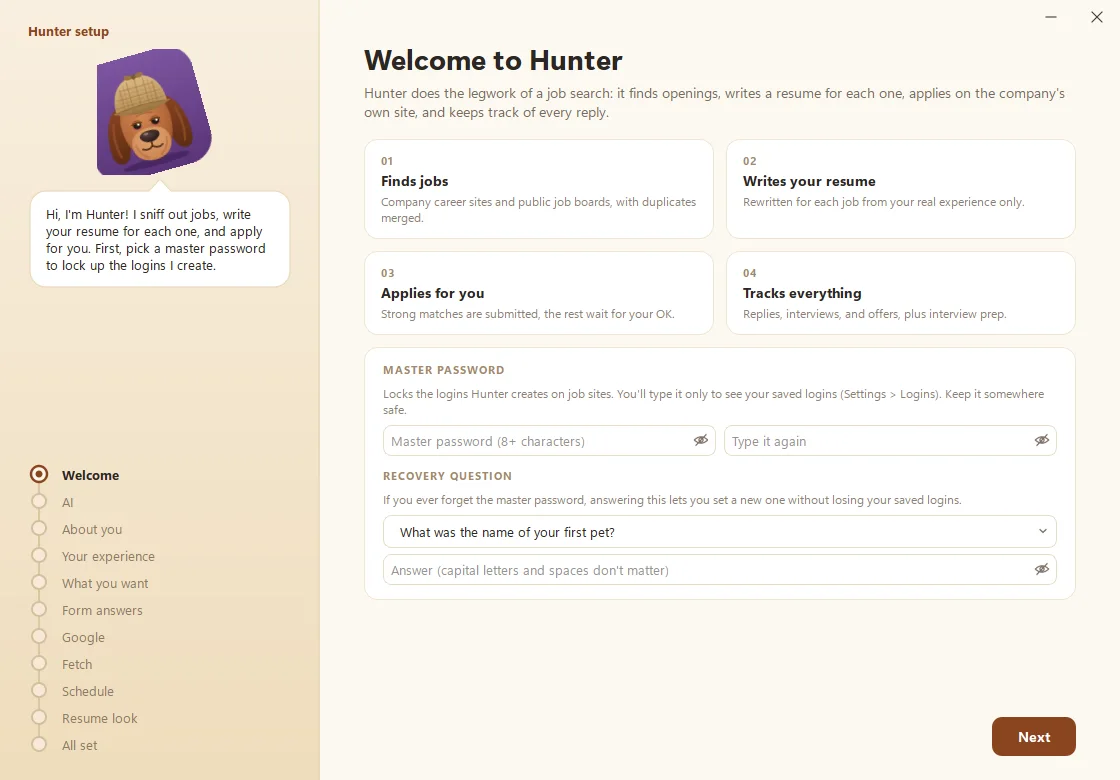
What does Hunter ask?
Hunter’s bloodhound covers more ground, because a job hunt has more moving parts:
- A master password for the logins Hunter creates on job sites (see Set up your vault).
- Your AI plan, then About you (name, email, phone, city, links).
- Your experience: a resume, your LinkedIn profile as a PDF, or notes. See Build your experience bank.
- What you want, Form answers, optional Google and Fetch connections, a Schedule, and a Resume look.
What does Kibble ask?
- What’s Kibble for? Personal, Business, or Both. See Switch on Business mode.
- Your budget: start with ready-made categories or your own. See Set up your first budget.
- Your business (if you have one): details for invoices. You can skip it.
- The dog: how chatty you’d like it, from dog words for money to holiday outfits.
- Start-up: whether Kibble waits in the tray and pops up for bills.
Where do I change things later?
Open Settings in any app (the gear, or right-click the tray icon). Changes save as soon as you make them.
Questions people ask
Can I skip a step and come back later?
Yes. Almost every choice in setup can be changed later in the app's Settings, and the guide tells you where.
Do I need Claude or ChatGPT to finish setup?
No. You can pick "Not now" and connect later. Without one, Fetch still writes transcripts, but AI notes, Hunter's scoring and Kibble AI need it.
Still scratching your head?
Send us a note and a real person will get back to you.