Connect your Gmail
How to connect a Gmail address to Kibble so it finds charges, refunds and deposits in your email and waits for you to add them.
To connect Gmail, open Kibble’s Settings > Email, click to add an address, and enter your Gmail address and a Google app password. Kibble then reads your email for charges, refunds and deposits, like receipts, card alerts, invoices and pay notices, and puts them in the Inbox for you to approve. Nothing enters your budget until you click Add.
How do I connect an address?
- Make an app password first. It takes two minutes: Make a Gmail app password.
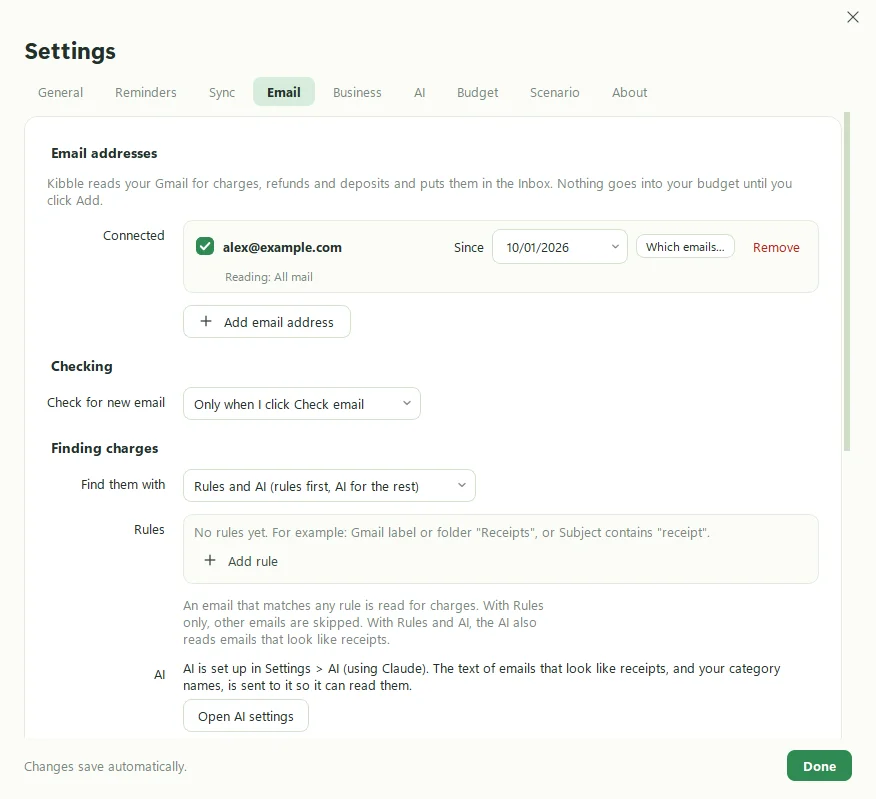
- In Kibble, open Settings > Email and add an address.
- Type your Gmail address and paste the 16-letter App password.
- Click Test connection. “Connected.” means you’re good.
- Choose How far back should I look?: from today on, the last 7, 30 or 90 days, or since a date.
- Choose Which emails should I read?: all your mail, only some folders or labels, and whether to read only unread emails.
Kibble checks for new email on its own. To check right now, click Check email on the Inbox, or right-click the tray icon.
How does Kibble decide which emails are receipts?
Choose in Settings > Email under Finding charges:
- Rules and AI (rules first, AI for the rest). This is the default and the best of both.
- Rules only. Rules match a Gmail label or folder, words in the subject, or the sender, such as
alerts@chase.com. - AI only. Uses your Claude or ChatGPT plan (see Use Kibble AI).
Kibble also learns from you. When you add an email from the Skipped tab, it can learn to include emails like it.
What happens to the email after I add it?
Under After adding a transaction, Kibble can put a Kibble label on it, move it into a Kibble folder, and/or mark it as read. The default is label only.
How often does it check?
Under Check for new email, choose Automatically (every few minutes, which you can set) or Only when I click Check email.
Is it safe?
The app password is stored in Windows Credential Manager. It only works for reading mail, and you can revoke it in your Google account at any time. The Inbox lives only on your computer. Next step: Review your Inbox.
Questions people ask
Does Kibble connect to my bank?
No. Kibble never logs in to your bank. It reads receipts and alerts in your email, and you can type transactions or import statements too.
Can I connect more than one Gmail address?
Yes. Add each one in Settings > Email, each with its own app password.
Does anything go into my budget on its own?
Never. Everything Kibble finds waits in the Inbox until you click Add.
Still scratching your head?
Send us a note and a real person will get back to you.