Set up your vault
How Hunter's vault locks the job site logins it creates with your master password, and what to do if you forget the password.
Hunter’s vault keeps the logins it creates on job sites, like that Workday account you’d never remember, encrypted with your master password. You create the password during setup. After that, you only type it to see or change saved logins in Settings > Logins. Hunter never saves the password itself.
Why does Hunter need a vault?
Many company career sites make you create an account to apply. Hunter creates those accounts for you while filling in applications and keeps each login, so it can sign back in to check on them later. LinkedIn and Indeed are different: you sign in to those yourself (see LinkedIn Easy Apply). Dozens of job site passwords add up fast, and they deserve a lock.
How do I set it up?
Setup’s first step asks for:
- A master password, 8 characters or more. Type it twice.
- A recovery question and answer. Pick one or write your own. Capital letters and spaces in the answer don’t matter.
Keep the password somewhere safe, like your password manager.
How do I see my saved logins?
Open Settings > Logins and type your master password. Hunter remembers it until it closes. From there you can Add, Edit, Show password, Copy password (cleared from the clipboard after 30 seconds), Open site or Delete. Logins belong to the current profile.
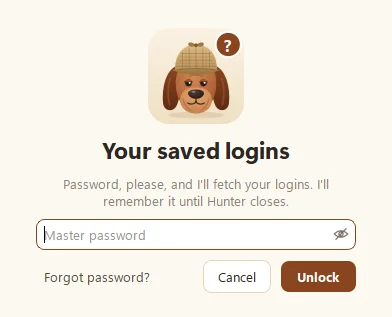
What if I forget the master password?
Click Forgot password? when Hunter asks for it, and:
- Answer your recovery question, then choose a new master password. Your saved logins are kept.
- If you don’t remember the answer either, click I don’t remember: reset instead. You set a new password, but saved site logins are deleted. Your profiles, jobs, applications and resumes are all kept.
How do I change the password?
In Settings > Logins, click Change master password, or Recovery question to update your question.
How safe is it?
Logins are encrypted on your computer with strong, modern encryption (scrypt and AES-GCM, if you like acronyms), and the key comes from your master password. Without it, the vault is just noise. More on our Security page.
Questions people ask
Does Hunter save my master password?
No, never. It only keeps a check file that tells it whether a password is right. Hunter remembers the password in memory until it closes.
Do I need to unlock the vault for Hunter to apply?
No. Hunter can still sign in to job sites for you while the vault is locked. You only type the master password to see, add or change saved logins.
Does the vault hold my LinkedIn or Indeed password?
No. You sign in to those yourself in Hunter's browser window, and Hunter never sees or saves those passwords.
Still scratching your head?
Send us a note and a real person will get back to you.