Connect Claude or ChatGPT to Fetch
How to sign in to Claude or ChatGPT in Fetch so it can write AI meeting notes and answer questions about your calls.
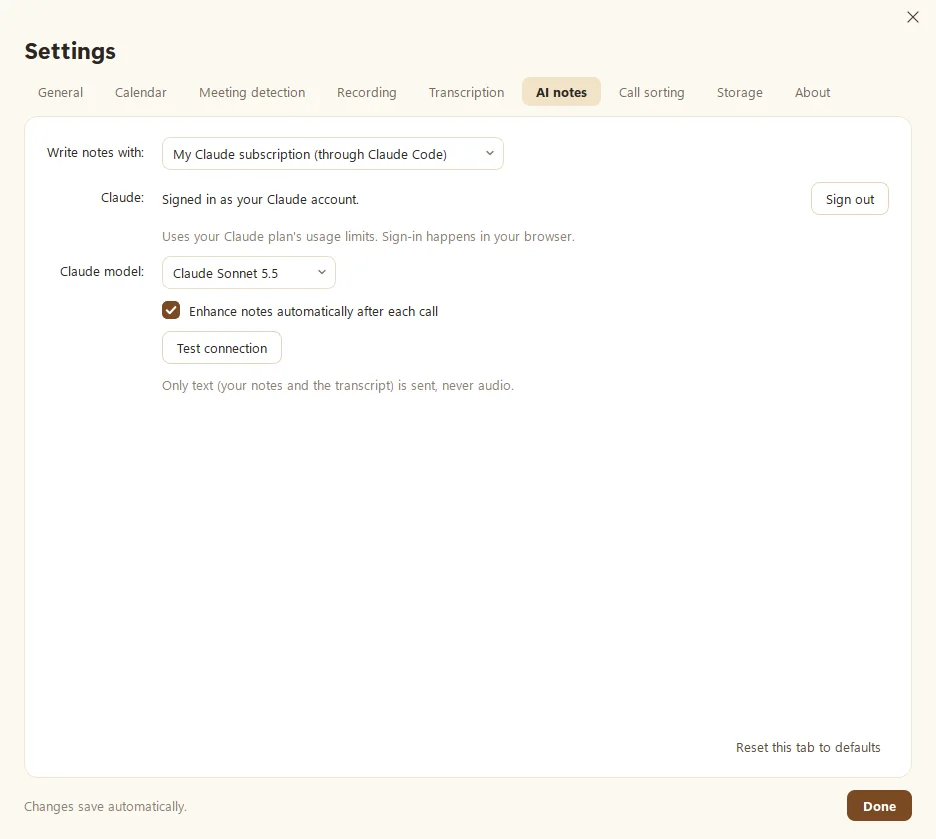
To connect AI in Fetch, open Settings > AI notes, choose Claude or ChatGPT under Write notes with, and click Sign in. Fetch uses the plan you already have (Claude Pro or Max, or ChatGPT Plus, Pro or Business) to write meeting summaries and answer questions about your calls.
How do I sign in?
- Open Settings > AI notes.
- Under Write notes with, pick Claude or ChatGPT.
- Click Sign in. If Claude Code or Codex (the free helper Fetch uses to reach your plan) isn’t installed yet, Fetch installs it from the official source first.
- Your browser opens. Sign in there. If the page shows a code, paste it into Fetch and click Submit code.
- Click Test connection. “Connected” means you’re done.
If the browser doesn’t open, click Open the sign-in page in the message, or Use a sign-in window instead for Claude.
What can I change here?
- Claude model: which Claude model writes your notes. ChatGPT picks the model for your plan by itself.
- Enhance notes automatically after each call: on by default, so notes are ready when you hang up. Turn it off to click Enhance notes yourself. See Enhance your notes.
What gets sent?
Only text: the transcript, your own notes, and the calendar invite’s agenda if there is one. Never audio. Requests count toward your plan’s usual limits, and they go straight from your computer to Claude or ChatGPT, not through Soggy Dog.
Fetch says my sign-in failed
Fetch quietly retries if Claude hiccups. If it keeps failing, it shows a message with a one-click Sign in again. You can also sign out and back in from Settings > AI notes. For more help with plans and the helper programs, see Connect your Claude or ChatGPT account.
Questions people ask
Is my audio sent to Claude or ChatGPT?
No. Only text is sent, meaning the transcript and your notes, and only when Fetch writes notes or answers a question.
Can I use Fetch without an AI plan?
Yes. You still get recording, live transcripts, search and folders. AI notes and Ask need Claude or ChatGPT.
Still scratching your head?
Send us a note and a real person will get back to you.