Set up your first budget
How to start a budget in Kibble, add accounts, give every dollar a job from Ready to Assign, and handle overspending.
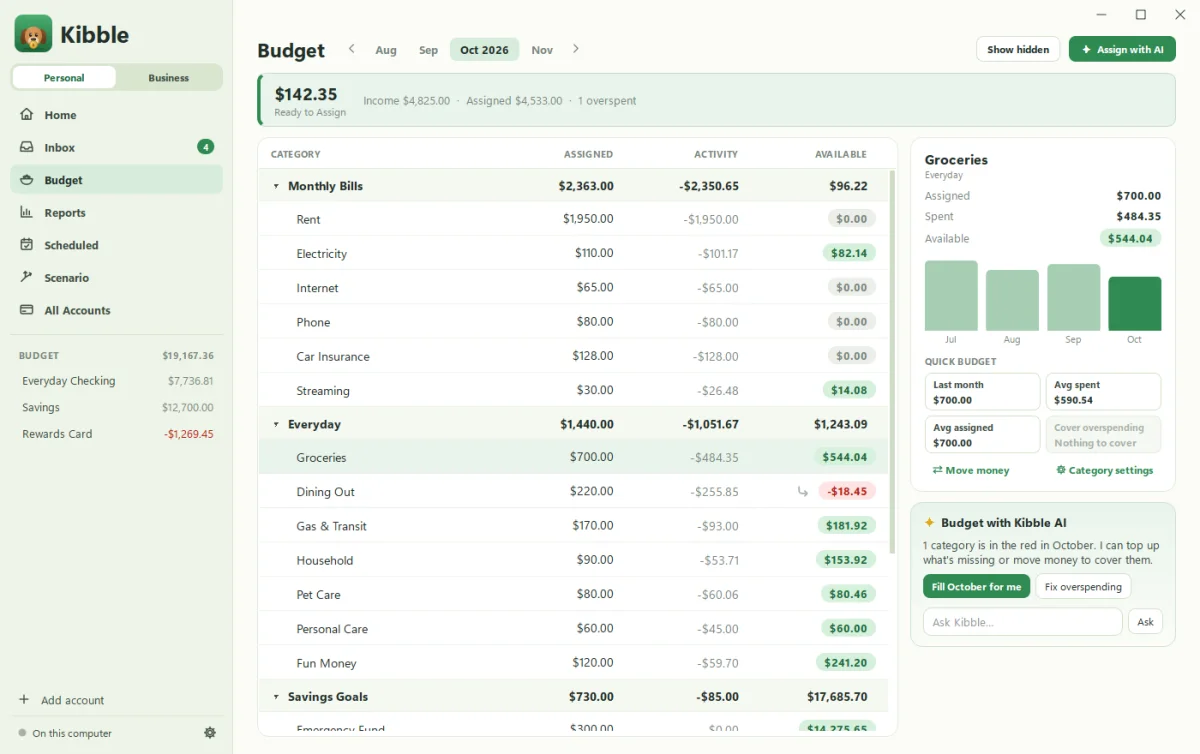
Kibble uses a monthly budget where every dollar gets a job. Add your accounts and their balances, and that money lands in Ready to Assign. Then give it out to categories like Rent, Groceries and Vacation until Ready to Assign reads zero. As you spend, each category shows what’s Available, so you always know what’s left.
How do I start?
- In setup’s Your budget step, choose Start with ready-made categories, or start empty and add your own on the Budget screen.
- Click Add account in the sidebar for each checking, savings and credit card account, with today’s balance.
- Open Budget (press B) and assign money from Ready to Assign to each category for this month.
The ready-made categories come in three groups:
- Monthly Bills: Rent or Mortgage, Electricity, Water, Internet, Phone, Insurance
- Everyday: Groceries, Dining Out, Gas & Transit, Household, Personal Care, Fun Money
- Savings Goals: Emergency Fund, Vacation, Gifts, Car Maintenance
Rename, add, hide or delete any of them. They’re a starting point, not a lecture.
How do I add transactions?
- Press A anywhere to add one by hand.
- Let Kibble find them in your email (see Connect your Gmail).
- Set up repeating bills and paychecks on Scheduled (see Scheduled bills and reminders).
What if I overspend a category?
It happens to the best of us. The category shows as overspent. Move money from another category to cover it, or let Kibble AI suggest the moves with Fix overspending (see Use Kibble AI). Kibble can also pop up when a category runs out, in Settings > Reminders.
What about next month?
When new money arrives, it goes back into Ready to Assign. Assign it again. Short on time? Fill for me budgets the month from your last three months of spending.
Where’s my budget saved?
On your computer, and it works offline. See Sync and the web app. If your income is irregular, read Budgeting on an uneven income.
Questions people ask
What does "Ready to Assign" mean?
Money you have that doesn't have a job yet. The goal is to assign all of it to categories until it reads zero.
Do I have to connect a bank?
No. Kibble never logs in to your bank. Add transactions by hand, from email receipts, or both.
Are there keyboard shortcuts?
Yes. Press A anywhere to add a transaction, B for the budget, H for home, R for reports and S for Scenario.
Still scratching your head?
Send us a note and a real person will get back to you.