Kibble vs Zoho Invoice
Two free ways to bill clients every month. Here's where each one shines, and how to move your Zoho history into Kibble.
Zoho Invoice and Kibble are both free ways to bill clients. Zoho Invoice is cloud software with online payments, a client portal and apps for phones and computers. Kibble is a Windows app that keeps your books on your own PC and adds pre-made monthly invoices, quarterly tax estimates and a personal budget. Zoho wins on online payments, the client portal and mobile apps. Kibble wins on taxes, privacy and having no invoice or project limits.
Facts about Zoho Invoice come from Zoho’s own website, checked October 30, 2026. Links are at the bottom.
At a glance
| Kibble | Zoho Invoice | |
|---|---|---|
| Where it runs | Windows app | Web, iPhone, Android, Windows, Mac |
| Where your books live | On your PC, works offline | Zoho’s cloud |
| Price | Free during early access | Free |
| Limits | No invoice or project limits | 2 users, 3 projects, 500 invoices a year |
| Branding on invoices | Yours only, in 5 looks and your color | “Powered by Zoho Invoice” |
| Monthly invoices | Pre-made 5 days early for you to review | Recurring invoices |
| Online payments | No | Yes, through gateways like Stripe and PayPal |
| Client portal | No | Yes |
| Time tracking | Yes, including Clockify import | Yes |
| Quarterly tax estimates | Yes, federal and state | Not listed on Zoho’s pricing page |
| Personal budget | Yes, in the same app | No |
Billing the same clients every month
Zoho Invoice sends recurring invoices on a schedule.
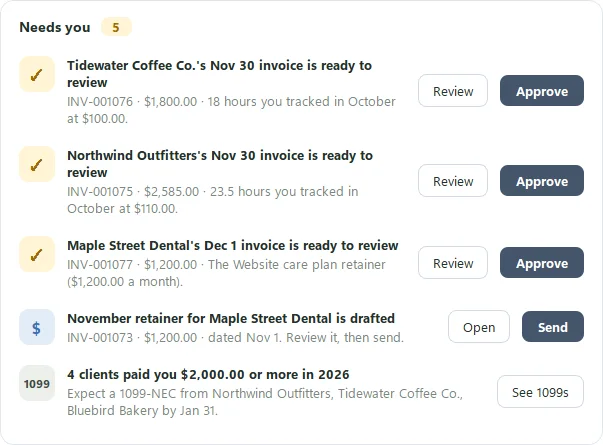
Kibble takes a review-first approach. When you’ve billed a client two months in a row, it makes next month’s invoice 5 days early with the status Review. It uses the same amount as last time, or the hours you tracked that month, and fills in the month for you with variables like {last_month} {last_month_year}. You approve it, skip the month, or stop it for that client. See Pre-made invoices.
Getting paid
Zoho Invoice lets clients pay online through gateways such as Stripe and PayPal. Zoho says it adds no fee of its own, though the gateway may charge one.
Kibble doesn’t process payments. It sends PDF invoices from your own email, drafts reminders when payments are late, and marks invoices paid when the money shows up in your account or inbox.
How your invoices look
Zoho’s free invoices carry “Powered by Zoho Invoice”. Kibble’s invoices carry only your business: pick Classic, Modern, Minimal, Compact or Standard, in your own color, and give any client its own look. See Invoice looks.
Taxes and your own money
Kibble sorts expenses by Schedule C line, estimates quarterly federal and state taxes, home office and mileage, flags 1099s, and builds a year-end ZIP for your accountant. It also runs your personal budget next to your business, kept separate. See Quarterly tax estimates.
Where Zoho Invoice wins
Pick Zoho Invoice if:
- Clients pay you online and you want payments built in.
- Clients want a portal to see and pay their invoices.
- You want phone apps or use a Mac.
- You work with a teammate in the same account.
Where Kibble wins
Pick Kibble if:
- You’d rather keep your books on your own PC.
- You bill the same clients every month and want the invoice ready for you to check.
- You’ve hit Zoho’s free limits on projects or invoices.
- You want quarterly tax estimates and your personal budget in one app.
Switching from Zoho?
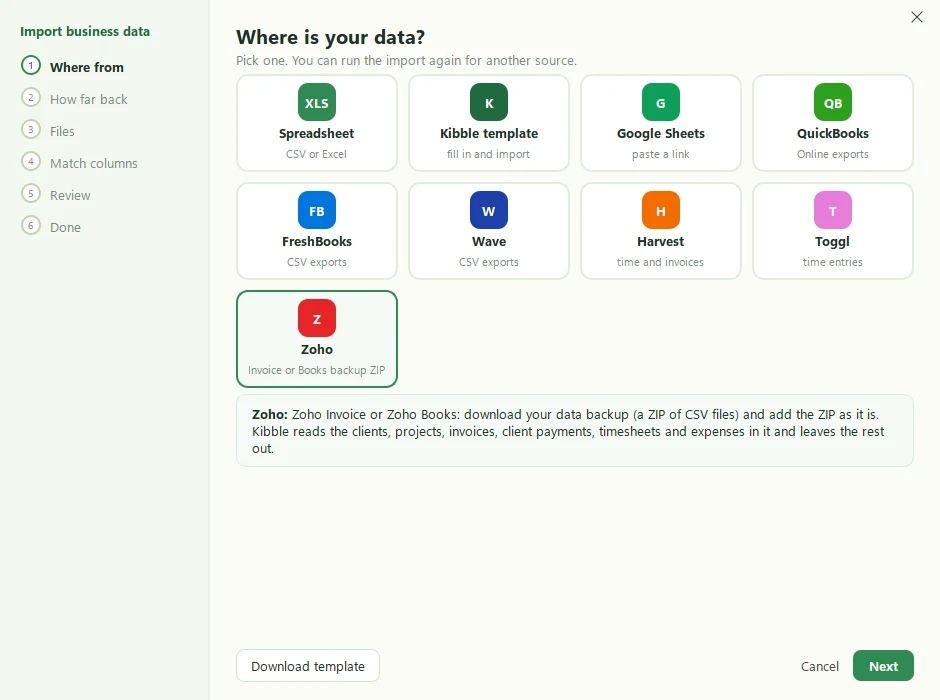
Download your data backup from Zoho Invoice or Zoho Books, then add the ZIP to Kibble’s business import as it is. Kibble reads your clients, projects (with their hourly rates), invoices and their lines, client payments, timesheets and expenses, and links paid invoices to their payments. See Import from Zoho.
Sources
Checked October 30, 2026. Prices and features change, so check Zoho’s site for the latest.
Zoho is a trademark of Zoho Corporation. Stripe and PayPal are trademarks of their owners. Soggy Dog Studios isn’t affiliated with any of them. This comparison is based on public information as of the date above.
Questions people ask
Is Zoho Invoice really free?
Yes. Zoho calls it forever free. Its pricing page lists up to 2 users, 3 projects and 500 invoices a year, with "Powered by Zoho Invoice" on invoices, as of October 30, 2026.
Can I move my Zoho Invoice history into Kibble?
Yes. Download your Zoho data backup ZIP and add it to Kibble's business import as it is. Clients, projects, invoices, payments, timesheets and expenses come over, and paid invoices are linked to their payments.
Which one takes online payments?
Zoho Invoice, through gateways like Stripe and PayPal. Zoho says it adds no fee of its own, but the gateway may. Kibble doesn't process payments; it marks invoices paid when the money arrives.
Does Kibble make recurring invoices?
Kibble makes next month's invoice for you to review, 5 days before you usually send it, using the same amount as last time or the hours you tracked. Nothing is sent until you approve it.
Still scratching your head?
Send us a note and a real person will get back to you.