Import from Zoho
How to move from Zoho Invoice or Zoho Books to Kibble by importing your Zoho data backup ZIP, with clients, invoices, payments, time and expenses.
To move from Zoho Invoice or Zoho Books to Kibble, download your Zoho data backup (a ZIP file), then in Kibble open Settings > Business, start an import, pick Zoho and add the ZIP as it is. Kibble finds your clients, projects, invoices, payments, timesheets and expenses, with the columns already matched.
Step 1: Download your Zoho data backup
Menu names can differ a little by product and plan, but generally:
- In Zoho Invoice or Zoho Books, go to Settings > Data Management > Backup Data.
- Start the backup. You need to be an admin of the Zoho organization.
- Zoho emails you a download link when it’s ready, usually within half an hour. Download the ZIP.
Zoho only lets you make a new backup every so often, so keep the ZIP somewhere safe. See Zoho’s backup help for details.
Step 2: Import it into Kibble
Open Settings > Business and start an import. If you don’t have business data yet, the banner on the Business Dashboard works too.
- Where from: pick Zoho.
- How far back: pick how much history to bring.
- Files: add the ZIP. No need to unzip it.
- Match columns: already done for you. Check anything you’re unsure about.
- Review: see what will be added. Possible duplicates are unticked.
- Done.
Big imports don’t freeze the window, and the Kibble dog fetches a bag of money while it saves.
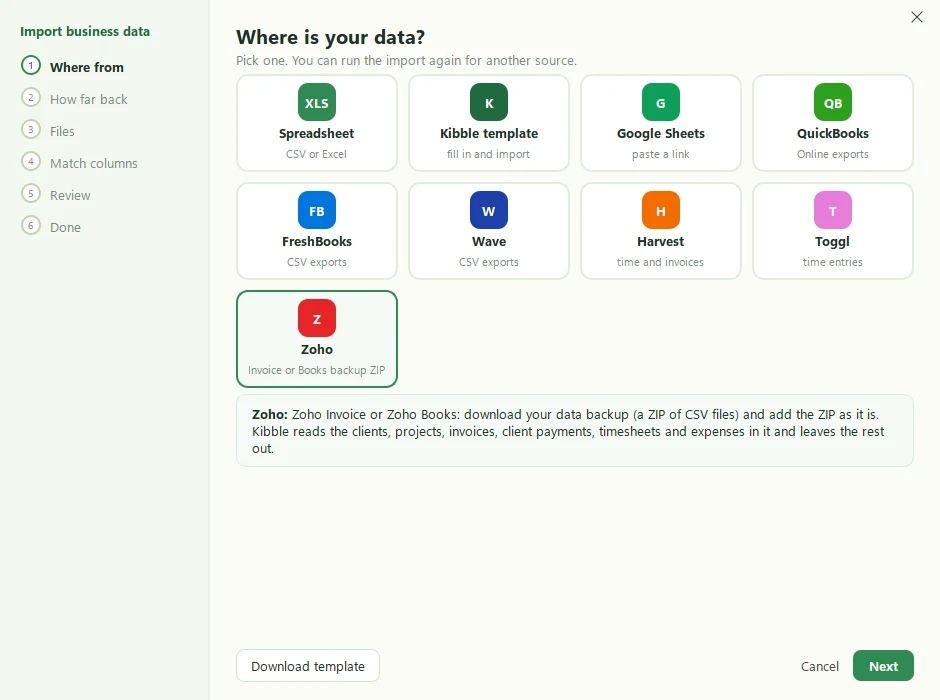
What comes over from Zoho?
| From the backup | In Kibble |
|---|---|
| Customers | Clients |
| Projects | Projects, with their hourly rates. A project billed by task uses its tasks’ rate. |
| Invoices and their lines | Invoices, linked to their payments |
| Customer payments | Client payments |
| Timesheets | Time |
| Expenses | Business expenses |
Everything else in the backup is left out.
What about other ZIP files?
Any other ZIP is read as the CSV and Excel files inside it, one kind of data per file, just like adding the files one by one. See Import from QuickBooks for the other tools Kibble imports from.
What’s next?
Once your clients are in, Kibble can make next month’s invoices for you, and you can pick an invoice look close to what your clients are used to.
Questions people ask
Do I need to unzip the backup first?
No. Add the ZIP exactly as Zoho sends it. Kibble reads the files inside.
Will my paid invoices show as unpaid?
No. Paid invoices are linked to the client payments in the backup, so they come in as paid.
What if I import the same backup twice?
Anything that looks like it's already in Kibble is flagged as a possible duplicate and left out unless you tick it.
Still scratching your head?
Send us a note and a real person will get back to you.