Kibble vs budget spreadsheets
When a real budget app beats a spreadsheet, and when it honestly doesn't.
A budget spreadsheet is free, endlessly flexible, and works anywhere. Kibble trades some of that flexibility for less typing and fewer mistakes. It finds transactions in your email receipts, does the every-dollar-has-a-job math for you, fixes overspending in a click, reminds you about bills, and, for freelancers, handles invoices and quarterly taxes. If you love formulas and don’t mind data entry, keep your spreadsheet. If the spreadsheet keeps getting abandoned by March, Kibble is worth a try.
At a glance
| Kibble | Budget spreadsheet | |
|---|---|---|
| Price | Free during early access | Free |
| Getting transactions in | Finds them in your Gmail, you click Add | You type every one |
| Budget math | Built in: Ready to Assign, Available, overspending | Your formulas (and your formula bugs) |
| Fixing overspending | One click, with a preview | Manual |
| Bill reminders | Pop-ups when bills are due | None, unless you build them |
| AI help | Fill the month, fix overspending, answer questions | Whatever you paste into a chatbot |
| Business invoices and taxes | Invoices, reminders, mileage, 1099s, quarterly estimates | A separate sheet, or a separate app |
| Flexibility | Opinionated | Anything you can imagine |
| Works on | Windows | Anywhere, including your phone |
| Sharing with a partner | On one computer for now | Easy, with a shared sheet |
Where spreadsheets win
Let’s start with the honest part. A spreadsheet is the better tool when:
- You want total control. Custom categories, charts, forecasts, color codes. A spreadsheet never says no.
- You share a budget with someone. A shared Google Sheet is hard to beat for two people on two phones.
- You use a Mac, a Chromebook or mostly your phone. Kibble is Windows only for now.
- You genuinely enjoy the ritual. Some people find typing in every receipt calming. We respect that. We don’t understand it, but we respect it.
Where Kibble wins
Kibble is the better tool when the spreadsheet keeps losing to real life:
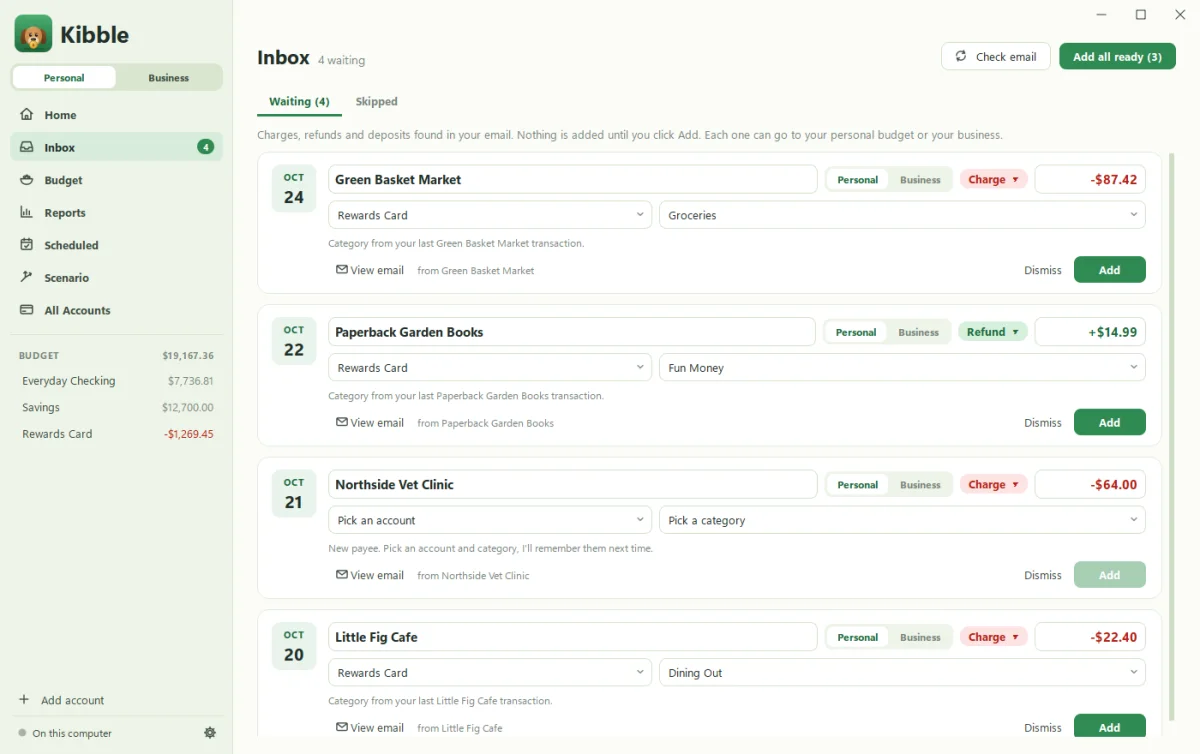
- Data entry is the bottleneck. Most budgets don’t fail on math. They fail because nobody logs the transactions. Kibble reads your receipts, card alerts and pay notices in Gmail, suggests the account and category, and waits for one click. See Connect your Gmail.
- You keep overspending without noticing. Each category shows what’s Available right now, and Kibble pops up when one runs out.
- Fixing the month feels like a chore. Fix overspending finds money to move, and Fill for me budgets a new month from your last three. You approve every change. See Use Kibble AI.
- Bills sneak up on you. Scheduled bills enter themselves or remind you on the day.
- You’re a freelancer. One app for your household budget and your business books, kept fully separate: hours, invoices that chase late payers, Schedule C expenses, mileage, 1099s and quarterly tax estimates.
What about privacy?
Both can be private. A spreadsheet on your own computer is as private as it gets, and a cloud spreadsheet lives on that provider’s servers. Kibble saves your budget on your computer, works offline, and never logs in to your bank. Email is read with a Google app password you can revoke any time, and nothing enters your budget until you click Add.
Can I use both?
Sure. Plenty of people keep a big-picture spreadsheet, like a net worth tracker or a five-year plan, and use Kibble for the day-to-day. Kibble’s Scenario planner covers a lot of “what if” questions too.
Ready to try it?
Set up your first budget in a few minutes. If your income is irregular, read Budgeting on an uneven income first. It works with Kibble or a spreadsheet.
Questions people ask
Can I move my spreadsheet budget into Kibble?
For business data, yes. Kibble imports clients, invoices, time, expenses and mileage from CSV, Excel or Google Sheets. For a personal budget, start fresh with Kibble's ready-made categories.
Does Kibble connect to my bank like some budget apps?
No. Kibble never logs in to your bank. It finds transactions in your email receipts, and you approve each one.
Is Kibble free?
Yes, during early access. A spreadsheet is free forever, of course.
Still scratching your head?
Send us a note and a real person will get back to you.