Kibble vs Wave
Two free ways to send invoices. Here's what else each one does, and what it costs to add.

Wave and Kibble both let freelancers send invoices for free. Wave is cloud software owned by H&R Block, with online payments, payroll and bank connections on its Pro plan. Kibble is a Windows app that adds time tracking, quarterly tax estimates and a personal budget, all kept on your own computer. Wave wins on online payments, payroll and mobile apps. Kibble wins on time tracking, taxes and privacy.
Facts about Wave come from its own website, checked October 29, 2026. Links are at the bottom.
At a glance
| Kibble | Wave | |
|---|---|---|
| Where it runs | Windows app | Web, iPhone, Android |
| Where your books live | On your PC, works offline | Wave’s cloud |
| Free invoices and estimates | Yes, unlimited | Yes, unlimited on Starter |
| Online payments | No | Yes, with fees |
| Bank connections | No, by design | Pro plan only, through Plaid |
| Time tracking | Yes, including Clockify import | Not found on Wave’s pages |
| Mileage | Built in | Through a Driversnote integration |
| Quarterly tax estimates | Yes, federal and state | Not found on Wave’s pages |
| Late reminders | Drafted at 5, 15 and 30 days for your approval | Automatic at 3, 7 and 14 days on Pro |
| Payroll | No | Yes, from $40 a month plus per person |
| Price | Free during early access | Starter free; Pro $19 a month |
What’s free, and what costs extra
Wave’s Starter plan is free with unlimited invoices, estimates and bills. Pro is $19 a month or $190 a year, and adds automatic bank imports, lower payment fees on your first 10 transactions each month, and automatic late reminders. Receipt scanning on Starter is an add-on, and payroll starts at $40 a month plus $6 per employee and contractor paid.
Kibble is free during early access, including time tracking, invoices, expenses, mileage and the Taxes screen.
Getting paid
Wave lets clients pay invoices online by card or bank transfer. On Starter, card payments cost 2.9% plus $0.60 each.
Kibble doesn’t process payments. It sends PDF invoices from your own email, drafts reminders when payments are late, and marks invoices paid when the money shows up in your account or inbox.
Taxes and time
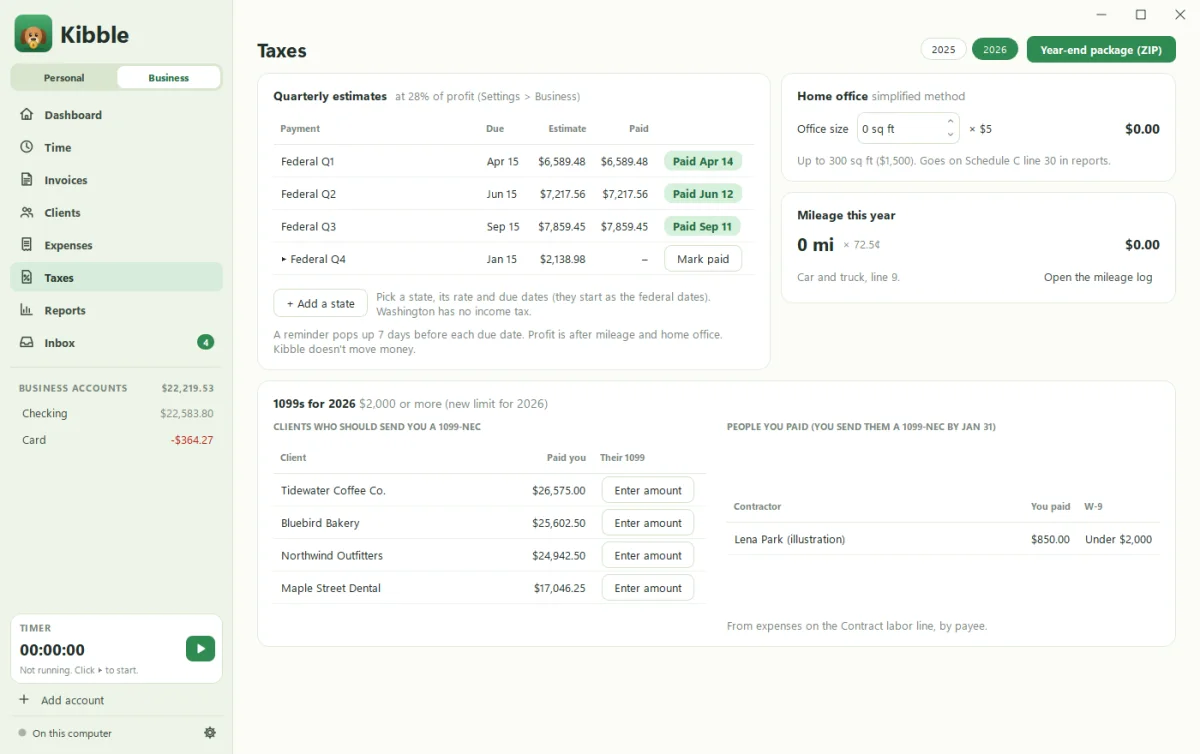
Kibble tracks hours and turns them into invoices, sorts expenses by Schedule C line, and estimates quarterly federal and state taxes, home office and mileage deductions. It also flags 1099s and builds a year-end ZIP for your accountant. See Quarterly tax estimates.
Wave connects to H&R Block’s tax services and makes 1099-NEC forms through payroll. We didn’t find built-in time tracking or quarterly tax estimates on Wave’s pages.
Where Wave wins
Pick Wave if:
- Clients pay you online and you want payments built in.
- You run payroll.
- You want bank feeds on Pro, and mobile apps.
- You use a Mac. Kibble is Windows only for now.
- You want access to H&R Block’s tax pros.
Where Kibble wins
Pick Kibble if:
- You bill by the hour and want time tracking built in.
- You want quarterly tax estimates without extra tools.
- You want your personal budget in the same app.
- You’d rather keep your books on your own PC.
Switching from Wave?
Export your customers, invoices and expenses from Wave and import them into Kibble. See Import from QuickBooks, which also covers Wave.
Sources
Checked October 29, 2026. Prices and features change, so check Wave’s site for the latest.
Wave is a trademark of its owner. H&R Block is a trademark of HRB Innovations, Inc. Soggy Dog Studios isn’t affiliated with either. This comparison is based on public information as of the date above.
Questions people ask
Is Wave really free?
Wave's Starter plan is free, with unlimited invoices, estimates and bills. Its Pro plan is $19 a month or $190 a year and adds bank connections. Payments, payroll and receipts cost extra, as of October 29, 2026.
Does Kibble track time like Wave?
Kibble tracks time with a timer, by hand, or from Clockify, and turns hours into invoices. We didn't find built-in time tracking on Wave's pages.
Which one connects to my bank?
Wave Pro connects to your bank through Plaid. Kibble never connects to your bank. It reads payment emails and statement files instead.
Can I bring my Wave data into Kibble?
Yes. Kibble imports clients, invoices and expenses from Wave exports, as well as QuickBooks, FreshBooks, Harvest, Toggl and spreadsheets.
Still scratching your head?
Send us a note and a real person will get back to you.