Kibble vs QuickBooks
The accounting giant against a small app that keeps your personal budget and business books side by side.
QuickBooks is the best-known small business accounting software, with bank feeds, online payments, payroll and a huge network of accountants. Kibble is a Windows app for freelancers that keeps your personal budget and your business books in one place on your own computer, without connecting to your bank. QuickBooks wins on payments, payroll, bank sync and accountants. Kibble wins on simplicity, privacy and price for a one-person business.
Facts about QuickBooks come from Intuit’s own website, checked October 29, 2026. Links are at the bottom.
At a glance
| Kibble | QuickBooks (solo plans) | |
|---|---|---|
| Where it runs | Windows app | Web and mobile app; desktop app for QuickBooks Online |
| Where your books live | On your PC, works offline | Intuit’s cloud |
| Bank sync | No, by design | Yes (1 connection on Free) |
| Invoices | Unlimited PDF invoices from your own email | 2 a month on Free, unlimited on Lite and up |
| Online payments | No | Yes, card and bank payments, with fees |
| Time tracking | Yes, including Clockify import | Not part of the solo plans we checked |
| Quarterly tax estimates | Yes, federal and state | See Intuit’s site for each plan |
| Payroll | No | Yes, as an add-on |
| Personal budget | Yes, in the same app | No |
| Price | Free during early access | Free; Lite $20 a month; Simple Start $38 a month (list prices) |
Which QuickBooks?
QuickBooks has changed for solo businesses. Intuit replaced QuickBooks Self-Employed with QuickBooks Solopreneur, and its solopreneur page now shows three plans:
- Free: 2 invoices, 2 receipts and 5 mileage trips a month, 1 contractor and 1 bank connection. No mobile app and no accountant access.
- Lite: unlimited invoices, receipts and mileage, and the mobile app. $20 a month list price, with an intro discount.
- Simple Start: adds unlimited contractors with 1099 prep and filing, and access for 2 accountants. $38 a month list price, with an intro discount.
Bigger plans with more users and features cost more.
Running a one-person business
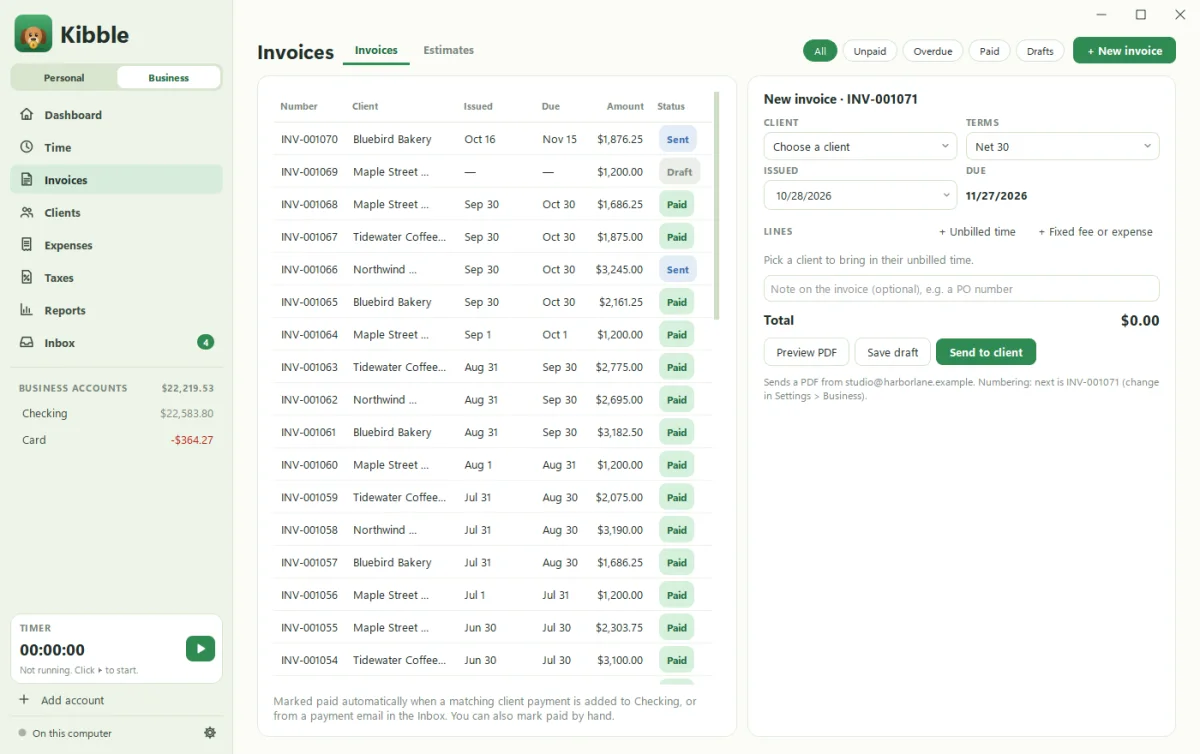
Kibble’s Business mode is built for freelancers. Track hours with a timer, by hand, or import them from Clockify. Turn hours into PDF invoices sent from your own email. Kibble drafts late reminders at 5, 15 and 30 days for your approval, turns estimates into invoices, and drafts monthly retainers. Expenses are sorted by Schedule C line, and the Taxes screen estimates quarterly federal and state payments, home office and mileage, and 1099s. At year end, download one ZIP for your accountant. See Switch on Business mode and Quarterly tax estimates.
QuickBooks does far more for growing companies: payments, payroll, inventory on higher plans, and accountant access. For one person, that can be more than you need.
Bank feeds and payments
QuickBooks connects to your bank, read-only, and stores data on Intuit-managed systems. It can also take payments on invoices, with fees listed on its rates page, such as 2.99% for invoiced card payments and 1% for bank transfers as of September 2026.
Kibble never connects to your bank, and it doesn’t process payments. It reads payment emails and statement files, and marks an invoice paid when the matching payment shows up.
Where QuickBooks wins
Pick QuickBooks if:
- Clients pay you online by card or bank transfer.
- You run payroll or pay many contractors.
- Your accountant works in QuickBooks.
- You want bank feeds and mobile apps, or use a Mac.
Where Kibble wins
Pick Kibble if:
- You’re a one-person business and want simple books.
- You want your personal budget and business books together, kept separate inside one app.
- You’d rather not connect your bank or keep your books in the cloud.
- You want time tracking and invoices without extra plans.
- You’d rather not pay. Kibble is free during early access.
Switching from QuickBooks?
Kibble imports clients, invoices, expenses and time from QuickBooks Online. See Import from QuickBooks.
Sources
Checked October 29, 2026. Prices and plans change often, so check Intuit’s site for the latest.
- QuickBooks Solopreneur plans (Free, Lite, Simple Start)
- QuickBooks pricing
- Introduction to QuickBooks Solopreneur (replacing Self-Employed)
- QuickBooks payment rates
- QuickBooks privacy and security
QuickBooks and Intuit are trademarks of Intuit Inc. Soggy Dog Studios isn’t affiliated with Intuit. This comparison is based on public information as of the date above.
Questions people ask
What happened to QuickBooks Self-Employed?
Intuit replaced QuickBooks Self-Employed with QuickBooks Solopreneur. Today Intuit's solopreneur page shows Free, Lite and Simple Start plans for solo businesses.
Is there a free version of QuickBooks?
Yes. QuickBooks Free includes 2 invoices and 2 receipts a month, 5 mileage trips a month and 1 bank connection, as of October 29, 2026. Kibble is free during early access with no such limits.
Can I move my QuickBooks data into Kibble?
Yes. Kibble imports clients, invoices, expenses and time from QuickBooks Online exports. It also imports from FreshBooks, Wave, Harvest, Toggl and spreadsheets.
Can clients pay invoices online with Kibble?
Not inside Kibble. Kibble sends PDF invoices from your own email and marks them paid when the payment shows up. QuickBooks can take card and bank payments, with fees.
Still scratching your head?
Send us a note and a real person will get back to you.