Use Kibble AI
How Kibble AI fills in your month, fixes overspending, answers budget questions and reads receipts, using your own Claude or ChatGPT plan.
Kibble AI is a set of helpers powered by your own Claude or ChatGPT plan. It can fill in your month from your last three months of spending, fix overspending by moving money where it’s needed, answer questions like “Can I afford a $400 trip in November?”, read receipts in your email, and give you a short monthly check-in. Set it up in Settings > AI.
How do I turn it on?
Kibble talks to your plan through a free helper program, which you install once:
- Claude: open PowerShell and run
irm https://claude.ai/install.ps1 | iex. - ChatGPT: install Codex from github.com/openai/codex (or
npm install -g @openai/codex).
Then open Settings > AI, choose Claude or ChatGPT, and click Sign in. More in Connect your Claude or ChatGPT account.
What can it do?
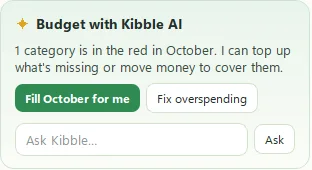
On the Budget screen, the Budget with Kibble AI card has:
- Fill for me. Assigns this month’s money based on your bills and the last three months. You see a preview of each category first. Accept them all or Review one by one.
- Fix overspending. Finds the best categories to borrow from to cover the ones that ran out. If there isn’t enough, it tells you what’s left uncovered.
- Check-in. A short look back at last month.
- Ask a question about your budget in plain words.
Elsewhere:
- Reading email for charges, refunds and deposits (see Connect your Gmail).
- Ask Kibble, from the tray menu, for questions about your money, and for drafting Scenario plans.
Can I undo what it did?
Yes. After Kibble AI assigns or moves money, you can undo it and everything goes back the way it was. If the budget changed since the preview, Kibble makes a fresh one rather than guessing.
What if the AI can’t help?
If your plan hits a limit or the connection hiccups, Kibble shows the plain-math numbers instead, so you’re never stuck. Woof, but politely.
What does it send?
Only what each helper needs, such as category names and amounts, or the text of emails that look like receipts. It goes from your computer to your own Claude or ChatGPT account. Settings > AI shows what gets sent, and each helper can be switched off on its own.
Questions people ask
Does Kibble AI change my budget by itself?
No. It shows a preview first, and nothing changes until you accept it. You can undo it afterward, too.
Which AI plans work?
Claude Pro or Max, or ChatGPT Plus, Pro or Business. Kibble uses the plan you already have.
Can I turn off individual helpers?
Yes. Each helper has its own switch in Settings > AI.
Still scratching your head?
Send us a note and a real person will get back to you.