Check a statement in the Statement Vault
How to drop a bank or card statement into Kibble's Statement Vault, see which lines are missing from your budget or books, and add them in a click.
The Statement Vault checks a bank or card statement against Kibble, line by line. Drop in a statement and Kibble shows what’s already recorded, what’s waiting in your Inbox, and what’s new. Add the new lines straight to the account in a click. It’s a quick way to catch the charge that never sent an email, and it works on both the Personal and Business side.
How do I add a statement?
- Download a statement from your bank’s or card’s website. A PDF, CSV, QFX or OFX file all work, and so does a picture of a paper statement.
- Open Statement Vault in the sidebar, under Inbox.
- Drag the file onto Drop a statement here, or click Choose a file.
- Check the Account at the top. Kibble suggests one from the card’s last 4 digits when the statement shows them. If not, pick it from the list.
CSV, QFX and OFX files are read right away. PDFs and pictures are read by Kibble AI, so Kibble asks first. Nothing is added to your budget or books until you say so.
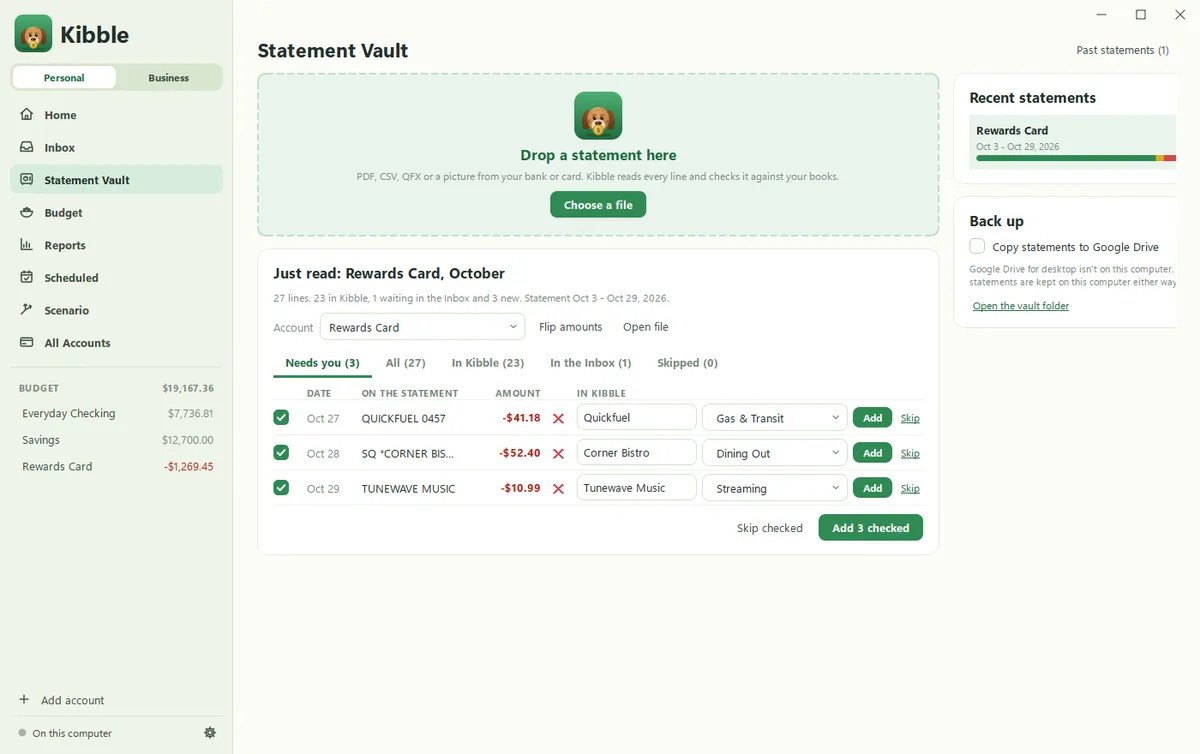
What do the tabs mean?
Kibble opens on Needs you, the lines that need a decision. The other tabs show every line, or one kind:
- In Kibble: the same amount is already in that account, within 3 days. If it only looks the same, click Add anyway.
- In the Inbox: an email for it is waiting in your Inbox. Click Add here to add it from the statement and take it out of the Inbox, or leave it there.
- New: not in Kibble yet. Check the payee and category (or the Schedule C line on the Business side) and click Add.
- Skipped: lines you chose to skip.
Card payments are skipped for you, since they’re already a transfer. A line that looks like a transfer, like money moved to savings, asks where it went. On the Business side, you can also mark one as an owner draw or an owner contribution.
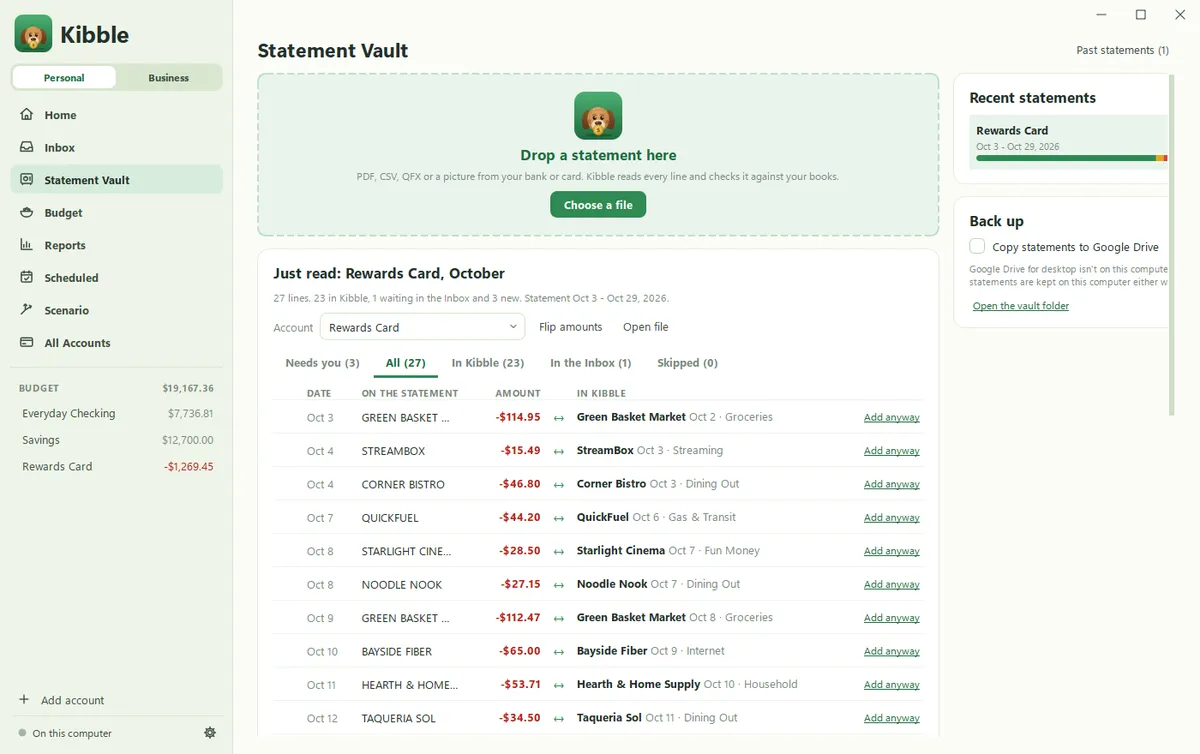
Can I add several lines at once?
Yes. Every line in Needs you has a checkbox. Click Add checked to add them all, or Skip checked to skip them. If any of them is missing a category, Kibble asks you to pick one first.
The amounts look backwards. What do I do?
Some banks show charges as positive numbers. Click Flip amounts and money in and money out swap places.
Where are my statements kept?
On this computer. Each statement shows under Recent statements with a bar for how much of it is in Kibble. Click Past statements to see them all, open one, or delete it.
To keep a copy in Google Drive too, tick Copy statements to Google Drive. They go in a Kibble Statements folder, by year. This needs Google Drive for desktop on your computer.
How is this different from Import statement on Expenses?
Import statement on the Business Expenses screen brings in a whole CSV or QFX file at once and checks the ending balance (see Import bank and card statements). The Statement Vault works on both sides, reads PDFs and pictures too, and only asks you about what’s missing.
Questions people ask
Does Kibble connect to my bank?
No. Kibble never logs in to your bank. You download a statement from your bank's or card's website, or take a picture of a paper one, and drop it in.
Do I need Kibble AI for this?
Only for PDFs and pictures. CSV, QFX and OFX files are read on your computer without the AI. For a PDF or picture, Kibble asks before sending it to your own Claude or ChatGPT plan.
When does a line count as already in Kibble?
When the same account has a transaction for the same amount within 3 days of the statement's date.
If I delete a statement, do I lose what I added from it?
No. Deleting a statement takes it out of the vault. Transactions you added from it stay.
Still scratching your head?
Send us a note and a real person will get back to you.