Fetch vs cloud meeting notetakers
Private, on-PC transcription versus tools that upload your calls. Here's where each one wins.

Fetch records meetings and turns speech into text on your own Windows PC, so your audio and transcripts never get uploaded. Most cloud meeting notetakers send your call’s audio to their servers to transcribe it, and many join the call as a visible bot. Fetch is the better fit if privacy and price matter most. A cloud tool is the better fit if you need Mac or phone apps, or shared team workspaces.
Cloud tools vary a lot, so check the details of any tool you’re considering. Here’s how they generally compare.
At a glance
| Fetch | Typical cloud notetaker | |
|---|---|---|
| Where speech becomes text | On your own computer | On the company’s servers, for most tools |
| Joins your call as a bot | No. It listens on your PC | Often, yes |
| Records without internet | Yes | Usually not |
| Works with in-person meetings | Yes, one click to record | Varies |
| AI summaries and Ask | Yes, with your Claude or ChatGPT account | Yes |
| Calendar briefings | Yes | Varies |
| Shared team workspace | No. Notes are files you share | Often, yes |
| Mac and phone apps | Not yet. Windows only | Often available |
| Price | Free during early access | Usually a monthly fee |
Where does your audio go?
This is the big one. With Fetch, the audio is captured on your PC and transcribed there by a speech model running on your own processor or graphics card. The recording is saved in your Documents folder. Nothing is uploaded unless you turn on a Google Drive backup, or pick the one optional online speech model (Deepgram) yourself.
With most cloud notetakers, the audio, or the whole call, goes to the company’s servers to be transcribed, stored and summarized. That’s not automatically bad. Reputable companies protect data carefully. But it does mean your conversations live on someone else’s computer, under someone else’s policies.
For client calls, HR conversations, legal or medical topics, or anything under an NDA, “it never left my laptop” is a much easier sentence to say. More on this in Local vs cloud transcription: what actually stays private.
What about AI summaries?
Both give you summaries, decisions and action items. The difference is whose AI and whose account.
- Fetch sends only text (the transcript and your notes) to your own Claude or ChatGPT plan, and only when it writes notes or answers a question. Never audio.
- Cloud notetakers usually run their own AI on their servers as part of the subscription.
If you already pay for Claude or ChatGPT, Fetch puts that subscription to work instead of adding another one.
The bot in the room
Many cloud notetakers join your Zoom or Meet call as a participant, like “Notetaker is recording”. Some people don’t mind. Others find it awkward, especially with clients or candidates. Fetch records from your own computer’s microphone and sound output, so there’s no extra guest. You should still tell people you’re recording. Fetch can even remind you each time.
Accuracy
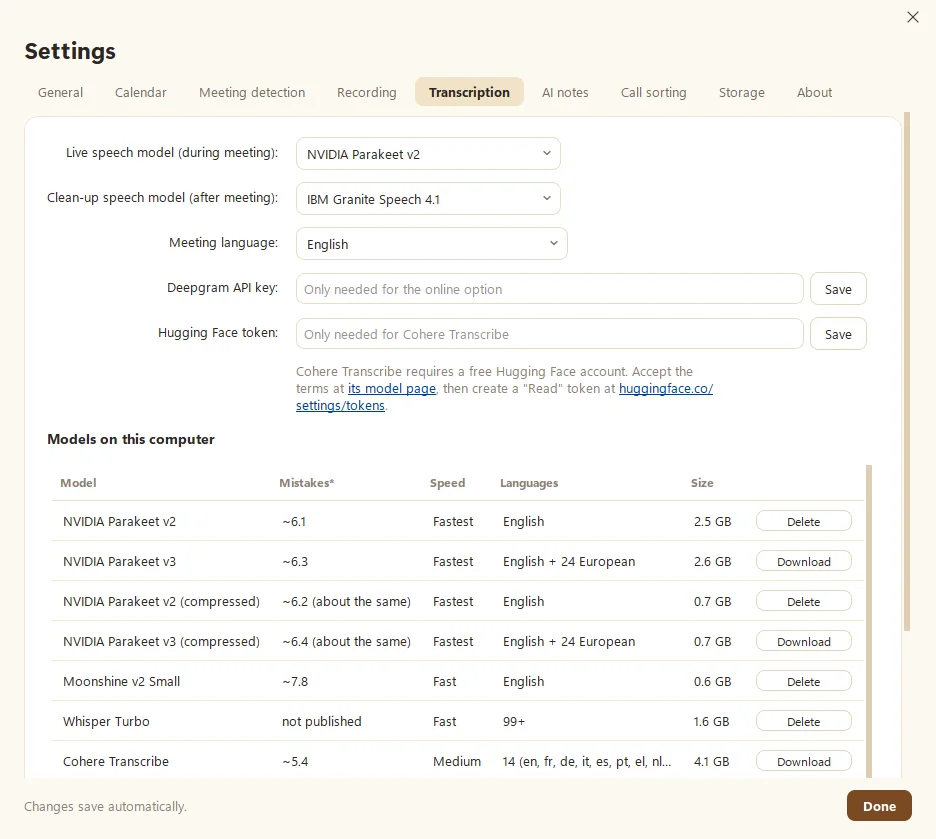
Both approaches can be very accurate. Fetch uses modern open speech models like NVIDIA Parakeet, Whisper and IBM Granite, with a fast live pass during the call and a more careful clean-up pass after. On a computer with an NVIDIA graphics card, it can run the most accurate models. On lighter laptops, it picks smaller models that stay quick. You can even compare two models on your own recordings.
Cloud services run big models on powerful servers, which can help with very long calls or unusual audio, and they don’t use your computer’s resources.
Where cloud notetakers win
Honesty time. Pick a cloud tool if:
- You’re on a Mac, or need phone apps. Fetch is Windows only for now.
- Your team wants one shared workspace, with everyone’s meetings, comments and permissions in one place.
- You don’t want anything running on your computer. Fetch needs some disk space and works hardest during calls.
- You need integrations with a CRM or project tool out of the box.
Where Fetch wins
Pick Fetch if:
- Privacy matters. Audio and transcripts stay on your PC.
- You hate the bot. Nobody sees an extra guest.
- You want to own your notes. Every meeting is a plain folder with Markdown notes and MP3 audio, readable without Fetch.
- You record in person, or offline. Fetch works on a plane, in a conference room, or with spotty Wi-Fi.
- You’d rather not pay another subscription. Fetch is free during early access and uses the AI plan you already have.
Switching from a cloud tool?
Bring your old transcripts along. Fetch imports transcripts from Zoom, Teams, Google Meet, Otter and Word, and you can paste in meetings from Granola. See Import recordings and transcripts and Import from Granola. Then record your first meeting.
Questions people ask
Is Fetch more private than cloud notetakers?
For audio and transcripts, yes. Fetch records and transcribes on your computer, so neither is uploaded. AI summaries go to your own Claude or ChatGPT account, and only as text.
Does Fetch join meetings as a bot?
No. It listens on your PC, so there's no extra guest in the call.
When is a cloud notetaker the better choice?
If you need Mac or phone apps, shared team workspaces, or you don't want to manage anything on your own computer.
How much does Fetch cost?
Fetch is free during early access. Cloud notetakers usually charge a monthly fee for full features.
Still scratching your head?
Send us a note and a real person will get back to you.