Fetch vs Granola
Two bot-free notetakers. The big difference is where your words get turned into text.
Fetch and Granola are both meeting notetakers that skip the bot: neither one joins your call as an extra guest. The main difference is where your words become text. Fetch transcribes on your own Windows PC and keeps the audio. Granola sends audio to cloud transcription providers and keeps the transcript and notes, not the audio. Granola wins on Mac and phone apps, team folders and integrations. Fetch wins on privacy, offline recording and price.
Facts about Granola come from its own website, checked October 29, 2026. Links are at the bottom.
At a glance
| Fetch | Granola | |
|---|---|---|
| Joins your call as a bot | No | No |
| Where speech becomes text | On your PC | In the cloud (Deepgram and Assembly) |
| Keeps the meeting audio | Yes, as MP3 files on your PC | No, transcript and notes only |
| Records and transcribes without internet | Yes | No, needs internet |
| AI summaries and chat | Yes, with your own Claude or ChatGPT account | Yes, built in |
| Apps | Windows | Windows, Mac, iPhone, Android |
| Team folders and sharing | No | Yes |
| Integrations (CRM, Notion, Zapier) | No | Yes, on paid plans |
| Price | Free during early access | Free Basic plan, Business $14 per user per month |
Where does your meeting go?
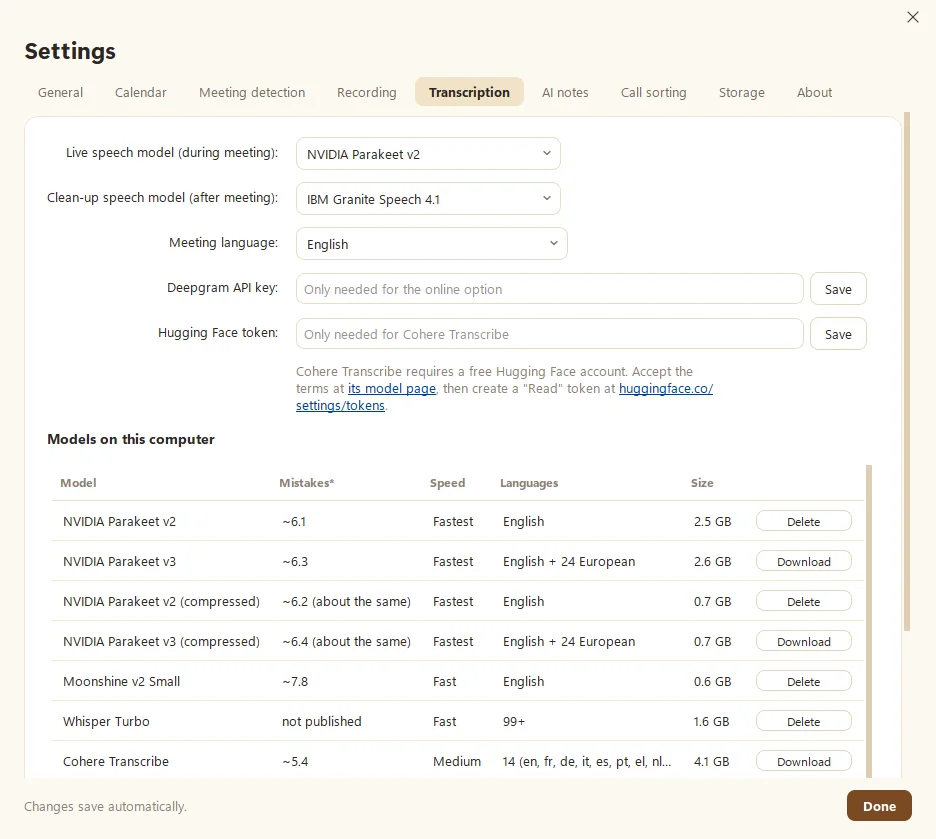
With Fetch, audio is captured on your computer and turned into text by a speech model running on your own processor or graphics card. The recording and transcript are saved in your Documents folder. Nothing is uploaded unless you turn on Google Drive backup or pick the one optional online speech model yourself.
Granola’s security page says transcription is handled by two outside providers, Deepgram and Assembly, and summaries by OpenAI and Anthropic. Granola says it doesn’t store meeting audio, and it keeps transcripts and notes in a US-hosted AWS private cloud. It’s SOC 2 Type 2 certified, and it says its outside providers may not train on your data. Granola itself may use anonymized data to improve its models unless you opt out in Settings.
That’s a careful setup. It’s still a different model from “the words never left my laptop,” which is what Fetch offers for audio and transcripts. More in Local vs cloud transcription.
Keeping the recording
Because Granola deletes audio, you can’t play back a moment to check who said what. Fetch keeps an MP3 of every call next to its notes, so you can listen again, re-transcribe with a different model, or keep the file for your records. Every meeting is a plain folder you can open without Fetch.
Offline and in person
Granola’s Windows guide says it needs an internet connection to transcribe. Fetch records and transcribes with no connection at all, which helps on a plane, in a client’s office with locked-down Wi-Fi, or in a conference room. Click Record for in-person meetings. AI notes need internet, since they come from your Claude or ChatGPT account.
Where Granola wins
Honesty time. Pick Granola if:
- You use a Mac or phone. Granola has Mac, iPhone, Android and Apple Watch apps. Fetch is Windows only for now.
- Your team shares notes. Granola has shared and team folders. Fetch keeps notes as files you share yourself.
- You want integrations. Granola connects to Notion, HubSpot, Attio, Affinity and Zapier on paid plans, and offers an API and MCP connector.
- You meet in many languages. Granola lists 32 languages.
- You need enterprise extras like SSO or HIPAA workspaces.
Where Fetch wins
Pick Fetch if:
- Privacy comes first. Audio and transcripts stay on your PC.
- You want the audio. Play it back, re-transcribe it, keep it.
- You record offline. No internet needed to capture and transcribe.
- You’d rather not pay per seat. Fetch is free during early access and uses the AI plan you may already have.
- You want your notes as plain files that don’t depend on any app.
Switching from Granola?
Bring meetings over one at a time: copy a transcript in Granola, then paste it into Fetch. Fetch can write fresh AI notes from it. See Import from Granola. There’s no audio to move, since Granola doesn’t keep it.
Sources
Checked October 29, 2026. Prices and features change, so check Granola’s site for the latest.
- Granola home page (platforms)
- Granola pricing
- Granola security (providers, audio storage, training)
- Granola for Windows guide (no bot, needs internet)
- Granola updates (languages, new apps)
Granola is a trademark of its owner. Soggy Dog Studios isn’t affiliated with Granola. This comparison is based on public information as of the date above.
Questions people ask
Is Fetch a Granola alternative for Windows?
Yes. Both run on Windows and record without a bot joining your call. Fetch also transcribes on your PC and keeps your audio, while Granola transcribes in the cloud and doesn't keep audio.
Does Granola work offline?
Granola's own Windows guide says it needs an internet connection to transcribe. Fetch records and transcribes without internet. Only AI notes need a connection.
Can I move my Granola meetings into Fetch?
Yes, one meeting at a time. Copy the transcript in Granola, then paste it into Fetch's Import window. There's no one-click import yet.
Which is cheaper?
Fetch is free during early access. Granola has a free Basic plan with 30 days of history, and its Business plan is $14 per user per month, as of October 29, 2026.
Still scratching your head?
Send us a note and a real person will get back to you.