Import from Granola
How to bring your Granola meeting transcripts into Fetch so you can search them, file them, and ask questions about them.
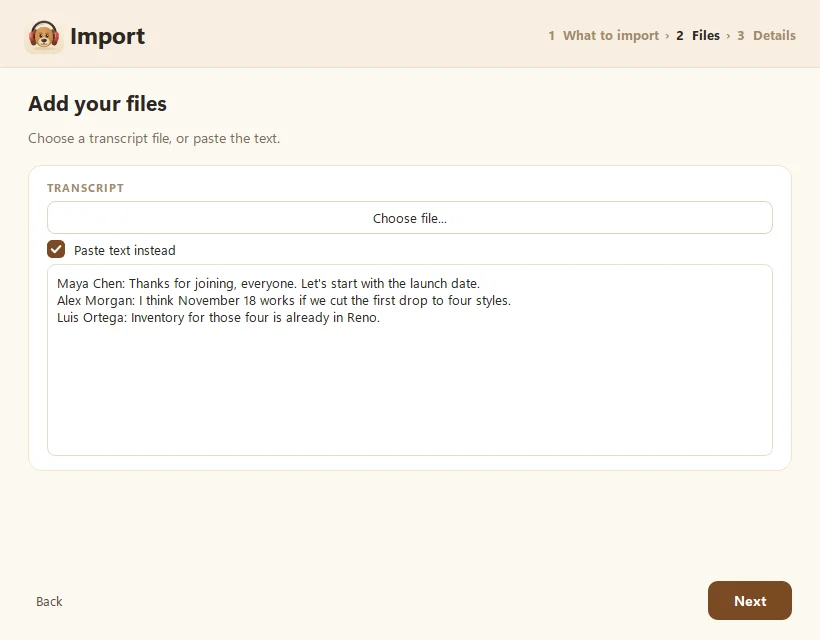
To move a Granola meeting into Fetch, copy its transcript in Granola, then in Fetch click Import, choose Transcript, tick Paste text instead, and paste. Fetch turns it into a regular call you can search, file into folders, and ask questions about. It can even write new AI notes from it.
How do I import a Granola meeting?
- In Granola, open the meeting and copy its transcript. If Granola offers a transcript file, you can save that instead.
- In Fetch, click Import at the bottom of the sidebar.
- Choose Transcript and click Next.
- Tick Paste text instead and paste the transcript, or click Choose file… for a saved file (.txt, .md, .docx, .vtt or .srt).
- On Check the details, set the title, the original date and time, and a folder.
- If the transcript has speaker names, pick Which speaker is you? so your lines show as Me.
- Leave Write AI notes after importing ticked if you want a fresh summary, then click Import.
What if the transcript has no speaker names?
Fetch will say so and offer Clean up with AI. Claude or ChatGPT splits the text into speaker lines and fixes punctuation without changing anyone’s words. You’ll need AI connected for this (see Connect Claude or ChatGPT to Fetch).
What about my Granola notes and summaries?
Paste anything you want to keep into the call’s My notes tab after importing. Then click Enhance notes to fold them into a new summary (see Enhance your notes).
Why switch from Granola?
That’s your call, and Granola is a fine tool. People usually move to Fetch for two reasons: Fetch transcribes on your own computer, so your audio never leaves it, and it’s free during early access. Our Fetch vs cloud meeting notetakers comparison covers the trade-offs honestly.
Can I import from other apps too?
Yes. The same Import button takes transcripts from Zoom, Teams, Google Meet, Otter, Word documents, or plain text, plus audio and video recordings. See Import recordings and transcripts.
Questions people ask
Can I bring over my Granola audio?
Granola doesn't keep audio, so there's none to bring. You get the transcript, and Fetch can write fresh AI notes from it.
Is there a one-click Granola import?
Not yet. For now you bring meetings over one at a time with Import, as shown here. It takes about a minute per meeting.
Will imported calls show up in Ask?
Yes. Once imported, they're searchable and Fetch can answer questions from them like any other call.
Still scratching your head?
Send us a note and a real person will get back to you.