Local vs cloud transcription: what actually stays private
Where your words go when an app turns speech into text, in plain terms.
Local transcription turns speech into text on your own computer, so the audio never leaves it. Cloud transcription uploads your audio to a company’s servers, which do the work and send back text. Both can be accurate. The privacy difference comes down to one question: who ends up holding a copy of your conversation? With local, it’s just you. With cloud, it’s you and the provider, under their policies.
Here’s what that means in practice, without the jargon.
What happens when an app transcribes speech?
Every transcription app does roughly the same three things:
- Captures audio, from your microphone and maybe your computer’s sound.
- Runs a speech model, a piece of AI that listens to the audio and writes out the words.
- Stores the result, the transcript and often the audio too.
The only real question is where step 2 happens. If the model runs on your computer, that’s local. If the audio is sent to a server to be processed, that’s cloud. Step 3 usually follows: cloud tools tend to keep the audio and transcript on their servers too, so you can see them on the web.
Where does your audio go with cloud transcription?
With a cloud service, the audio travels over the internet (encrypted, if the service is any good) to the company’s computers. There, it’s transcribed, and often:
- Stored, so you can play it back and search it from any device.
- Processed further, for summaries, speaker labels and highlights.
- Kept for a while under the company’s data retention policy.
Reputable providers protect this data seriously. But “protected” isn’t the same as “not there”. Your conversation now exists in two places, and the second place is governed by a privacy policy you probably skimmed. Policies can change, companies get acquired, and data breaches happen to careful companies too.
Where does your audio go with local transcription?
Nowhere. The audio is recorded to your disk, the speech model reads it from your disk, and the transcript is written back to your disk. If you unplug the internet, it still works.
That’s how Fetch works by default. Recordings and transcripts are saved in your Documents folder, one folder per meeting, as plain MP3 and Markdown files. See Where are my recordings saved?.
Is local transcription accurate enough?
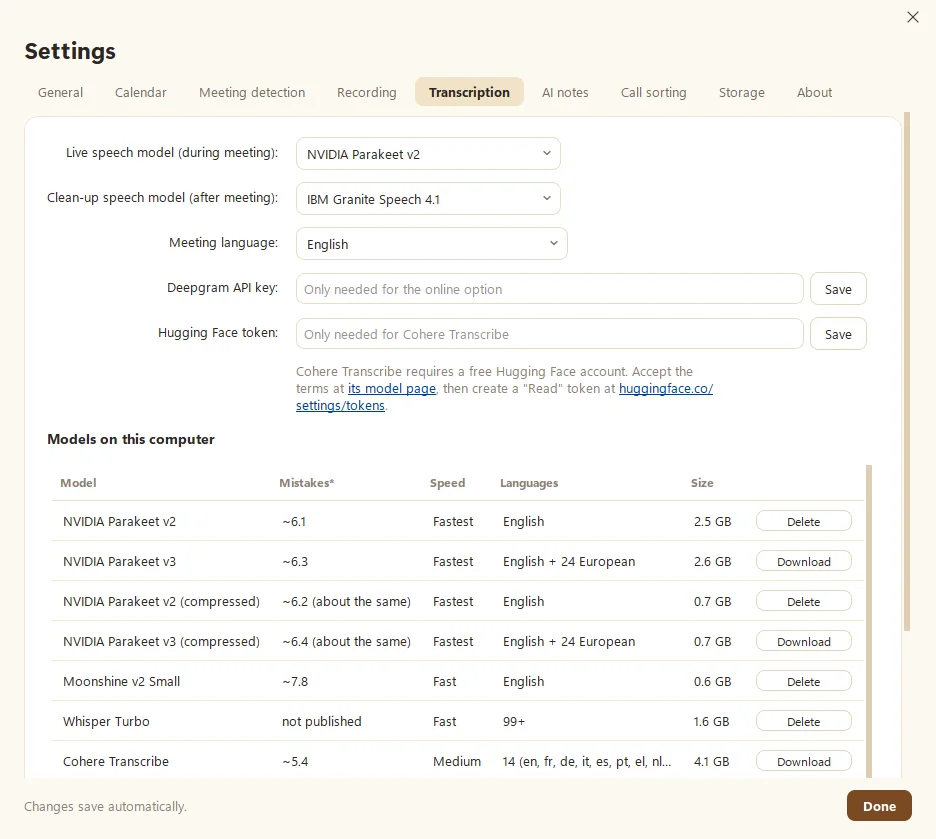
A few years ago, the honest answer was “not really”. Today it’s a different story. Open speech models such as NVIDIA Parakeet, OpenAI’s Whisper and IBM Granite Speech run well on ordinary computers and score in the same ballpark as cloud services on public tests.
A few things still affect accuracy either way:
- Audio quality. A decent headset beats a laptop mic across the room, every time.
- Accents, jargon and names. All models stumble on unusual names. A careful second pass helps.
- Crosstalk. People talking over each other is hard for every model, and for every human.
Fetch handles this with two passes: a fast live model during the call, then a slower clean-up model after. You can also run two models on the same recording and compare the transcripts yourself. See Choose a speech model.
Does local transcription slow down my computer?
It uses your computer’s power instead of a server’s, so yes, a little, mostly during the call. With an NVIDIA graphics card, it barely registers. On a lighter laptop, smaller models like a compressed Parakeet or Moonshine keep things snappy. Good apps pick the model for you based on your hardware.
What about AI summaries?
This is the part people miss. Transcription might be local, but the summary is often a separate step. Large AI models that write summaries usually run in the cloud.
So ask two questions:
- What gets sent? Audio, or just text?
- Whose account is it? Yours, or the app’s?
With Fetch, only text (the transcript and your notes) goes to your own Claude or ChatGPT account, and only when it writes notes or answers a question. Never audio. If you’d rather not send anything, skip AI notes entirely. You’ll still have the full transcript.
What about who said what?
Telling speakers apart, known as speaker labels, is another place where the approaches differ. Cloud services often do it on their servers, using the full call audio. Local apps have a neat shortcut: they can record your microphone and your computer’s sound as separate tracks. Everything from your mic is you. Everything from the computer is everyone else. That alone makes a transcript far easier to read.
Fetch goes a step further and learns voices over time. Tell it once who a speaker is, and it fixes every line they said and recognizes them next time, all on your computer. No voiceprints are uploaded anywhere.
Can I mix local and cloud?
Yes, and plenty of people do. A sensible split is local transcription for everything, plus a cloud AI only for the summary, sending text instead of audio. Some local apps also offer an optional online speech service for unusual languages. In Fetch, that’s Deepgram, and it’s off unless you add a key and choose it. The point is that you decide, call by call, what leaves your computer.
A quick privacy checklist for any transcription app
Before you trust an app with your meetings, check:
| Question | Why it matters |
|---|---|
| Where does speech become text? | Local keeps the audio on your computer |
| Is audio stored on their servers? | Stored data can be breached or subpoenaed |
| Does it join the call as a bot? | Everyone sees it, and some people mind |
| What’s sent for AI summaries? | Text only is better than audio |
| Can I delete everything, completely? | You should be able to |
| Does it work offline? | A good sign it’s truly local |
When is cloud transcription the right choice?
Cloud makes sense when you need your transcripts on every device, when a whole team shares one workspace, or when your computer can’t spare the power. Those are real benefits. Just make the choice knowingly. We lay out the trade-offs honestly in Fetch vs cloud meeting notetakers.
What about deleting recordings?
With local files, deleting is simple: delete the folder and it’s gone, apart from any backups you made. With a cloud service, “delete” depends on the provider’s retention rules and backups, so check their policy for how long deleted data lingers. Either way, it’s worth deciding up front how long you actually need audio. Fetch can delete old audio automatically after 30, 90 or 365 days and keep the notes and transcripts.
The bottom line
Local transcription keeps your conversations where they started: with you. In 2026, it’s accurate, fast and free to run. For client calls, interviews, HR conversations, or anything you’d rather not have on someone else’s server, it’s an easy call. For a practical setup, see How to take meeting notes without typing a word.
Questions people ask
Is local transcription as accurate as cloud?
It can be very close. Modern open speech models running on a laptop now score near cloud services on public tests. Your own audio is the real test, so compare on a real meeting.
Does local transcription need a powerful computer?
Not anymore. A graphics card helps, but smaller and compressed models run well on ordinary laptops.
If transcription is local, is everything private?
Not automatically. Check where summaries, backups and sharing go too. Every feature that sends text somewhere is a door worth knowing about.
Still scratching your head?
Send us a note and a real person will get back to you.