Check your budget against your bank statement
Your budget is only as good as what's in it. Ten minutes with your statement each month finds what slipped through.
To check your budget against your bank statement, take last month’s statement for each account and go line by line: for every charge, deposit and refund on the statement, find the same amount in your budget, within a few days. Anything on the statement that isn’t in your budget gets added. Anything in your budget that isn’t on the statement gets a second look. It takes about ten minutes an account, and afterward you know your numbers are right.
Why bother?
A budget only works if it has everything in it. If a few charges never make it in, your categories look healthier than they are, and you find out when the account is lower than you expected.
Some things slip through more than others:
- Charges with no email or alert. Parking meters, some subscriptions, small online stores, and anything paid by tapping a card at a place that doesn’t email receipts.
- Tips. A restaurant charge often shows up first without the tip, then posts higher a few days later.
- Charges entered twice, once by hand and once from an email or alert.
- Refunds that you never noticed came back.
- Bank fees and interest, which rarely send a receipt.
How to do it
- Download the statement. On your bank’s or card’s website, find last month’s statement. Most also let you download the activity as a CSV file, which is easier to work with than a PDF.
- Start with the charges. For each line, find the same amount in your budget, for that account. Allow a few days’ difference in the date, since banks often post a day or two after the purchase.
- Add what’s missing. Give each one a category, the same as if you’d entered it that day.
- Look at what’s left over. Anything in your budget that isn’t on the statement might be a duplicate, a charge still pending, or one entered in the wrong account.
- Check the ending balance. If your budget’s balance for the account matches the statement’s ending balance on the same date, you’re done.
Do it for your credit card first. Small charges hide there, and it’s usually the account with the most lines.
What to do when the numbers still don’t match
Look for these, in order:
- A tip or a changed amount. The amount in your budget is a little lower than the statement’s. Change it to the posted amount.
- A duplicate. The same payee and amount, entered twice. Delete one.
- The wrong account. A charge is in your budget, but on your checking instead of the card.
- A transfer counted as spending. Paying your card or moving money to savings isn’t spending. It should be a transfer between accounts.
If the gap is exactly a round number or matches one line, it’s almost always one of these.
How Kibble helps
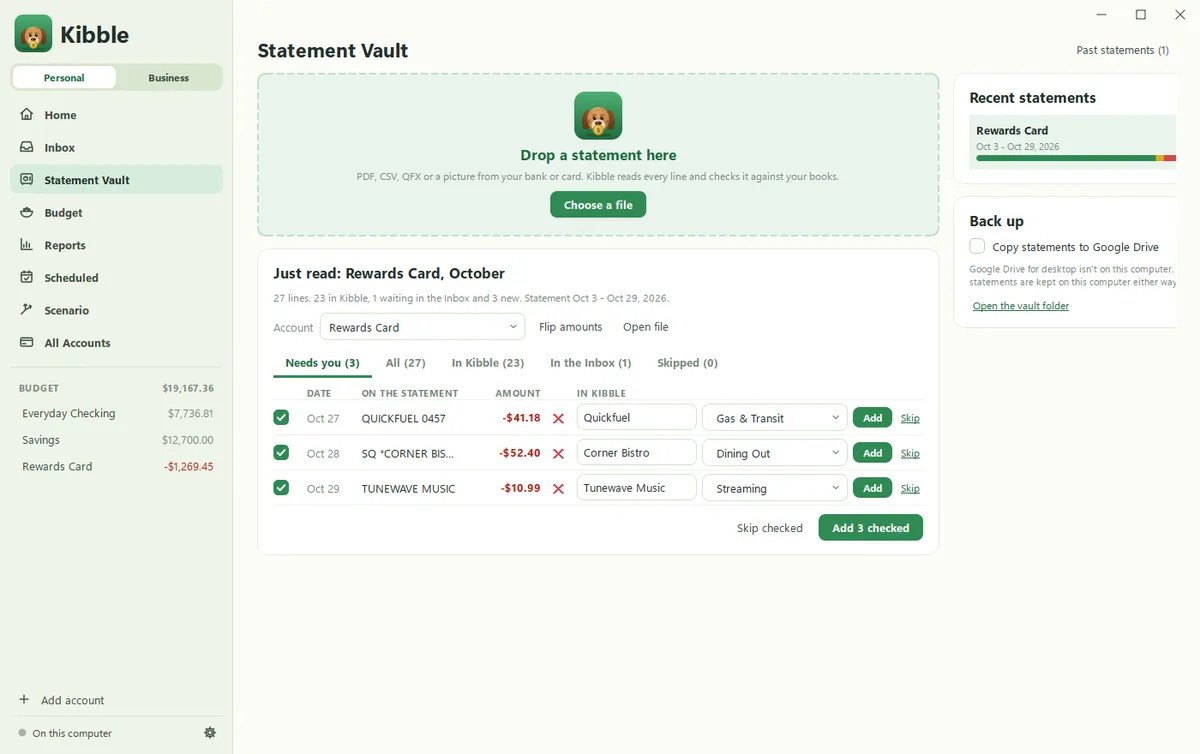
Kibble’s Statement Vault does the line-by-line part for you. Drop in a statement, as a PDF, CSV, QFX or OFX file, or a picture of a paper one, and Kibble checks every line against the account:
- In Kibble: the same amount is already there, within 3 days.
- In the Inbox: an email for it is waiting to be added.
- New: not in Kibble yet. Pick a category and click Add, or tick several and add them at once.
Card payments are skipped for you, and anything that looks like a transfer asks where the money went. CSV and QFX files are read on your computer. PDFs and pictures are read by Kibble AI, with your own Claude or ChatGPT plan, and Kibble asks first.
Kibble’s Inbox also adds the tip for you on restaurant charges, since card alerts usually show the amount before the tip, so fewer amounts are off in the first place. See Check a statement in the Statement Vault and Review your Inbox.
Make it part of your monthly money check-in: check the statement first, then look at where the money went.
The short version
- Once a month, take each account’s statement.
- Match every line to your budget by amount, within a few days.
- Add what’s missing, and look twice at what’s only in your budget.
- Watch for tips, duplicates, the wrong account, and transfers counted as spending.
- Start with your credit card.
Questions people ask
How often should I check my budget against my bank statement?
Once a month, when the statement comes out. If you use a credit card a lot, checking the card statement matters most, since that's where small charges hide.
Why doesn't my budget match my bank balance?
Usually a charge that's missing from the budget, one that was entered twice, a tip added after the charge, or a pending charge that changed when it posted. Going line by line finds it.
Do I need to match every line exactly?
Match the amount and get close on the date. Banks often post a charge a day or two after you made it, so a few days' difference is normal.
Still scratching your head?
Send us a note and a real person will get back to you.