Import bank and card statements
How to import business bank and credit card statements into Kibble as CSV or QFX files, with duplicates skipped and balances checked.
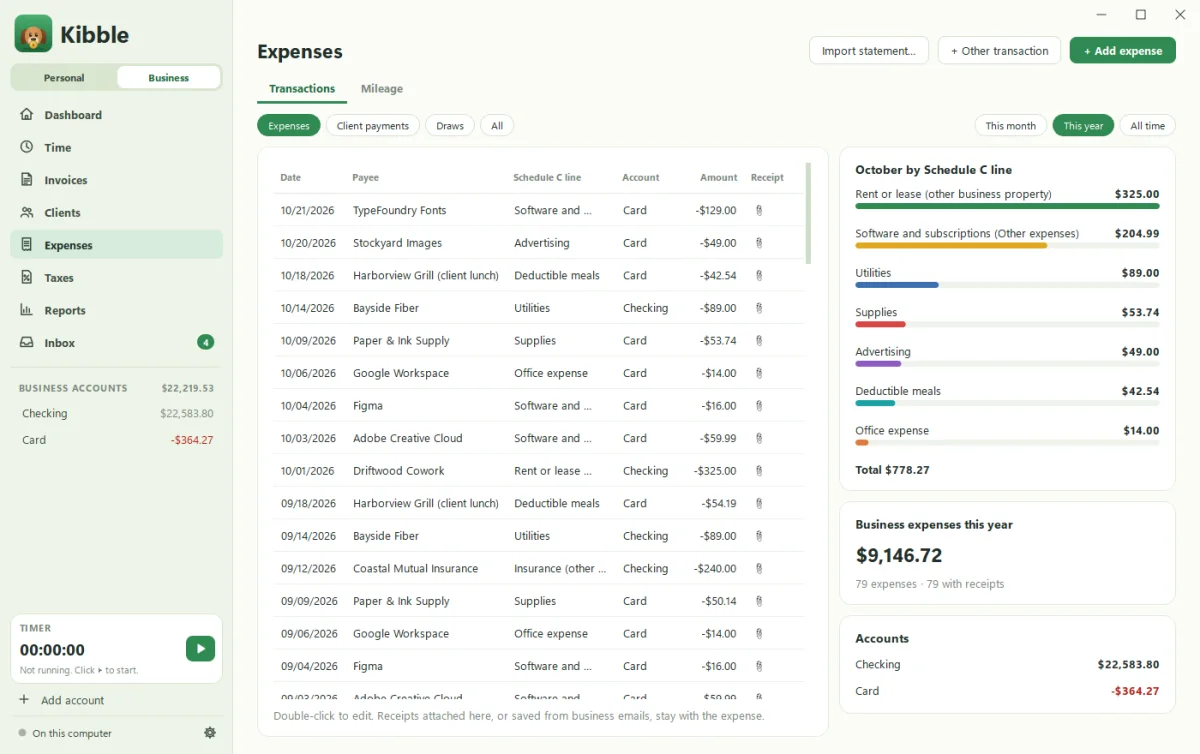
To bring business transactions in from your bank, download a CSV or QFX statement from your bank’s or card’s website, then click Import statement… on Kibble’s Expenses screen. Kibble matches the columns automatically, skips duplicates, and checks the ending balance so you know nothing was missed.
How do I download a statement?
On your bank’s or card’s website, look for Download, Export or Download transactions on the account’s activity page. Choose:
- CSV (works everywhere), or
- QFX (Quicken format, often the most reliable)
Pick a date range that starts where your Kibble records end.
How do I import it?
- Open Expenses on the Business side.
- Click Import statement… and choose the file (CSV, QFX, OFX or QBO).
- Choose which account it’s for, your business Checking or Card.
- Check the preview. Each row shows the date, payee, Schedule C line and amount. Untick anything you don’t want. Rows already in Kibble (same date and amount) are skipped.
- If charges show up as positive numbers, tick Charges show as positive amounts in this file (flip signs).
- Enter the Statement ending balance and import.
Kibble compares its balance after the import with the statement’s ending balance. A match says Reconciled ✓. If not, something’s missing or doubled, and now you know where to look.
How do expenses get their Schedule C line?
Each expense goes on a Schedule C line, like advertising, supplies or contract labor. Kibble suggests one, and remembers your choice for each payee. You can change it by double-clicking the expense.
What about receipts?
Attach a receipt to any expense on the Expenses screen. Receipts saved from business emails stay with the expense too. They all end up in the year-end ZIP.
Is this for my personal budget too?
Statement import is part of Business mode. For your personal budget, transactions come from email receipts (see Review your Inbox), scheduled bills, or quick entry with A.
Moving from other bookkeeping software?
Import your whole history from QuickBooks, FreshBooks, Wave and more. See Import from QuickBooks.
Questions people ask
Does Kibble connect to my bank directly?
No. Kibble never logs in to your bank. You download a statement file from your bank's website and import it.
What if a transaction is already in Kibble?
Kibble spots likely duplicates, such as ones added from the Inbox, and skips them.
Still scratching your head?
Send us a note and a real person will get back to you.