Practice a mock interview
How to practice a job interview with Hunter's AI interviewer, typed or out loud, and get a scorecard with what to work on.
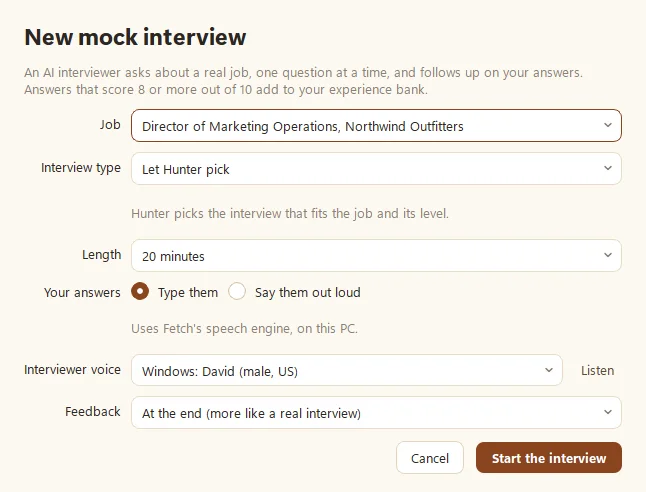
To practice an interview, open Mock interviews in Hunter and click New mock interview. Pick the job, the interview type and the length, choose whether to type or say your answers out loud, and click Start the interview. An AI interviewer asks one question at a time, follows up, and ends with a scorecard.
How do I set one up?
- Click New mock interview (or Mock interview on any job or application).
- Pick a job from your list, or Paste a job posting…
- Choose the Interview type:
- Let Hunter pick (based on the job and its level)
- Recruiter screen, Hiring manager, Behavioral (STAR)
- Skills deep dive, Panel, Executive / C-level, Case / strategy
- Pick a length, from 10 to 60 minutes.
- Choose Your answers: typed, or Say them out loud.
- Pick an Interviewer voice: a Windows voice, a natural-sounding offline voice (downloaded once), or No voice (text only).
- Choose when to get feedback: At the end (more like a real interview) or After each answer.
How do I answer out loud?
Spoken answers use Fetch’s speech engine (see Prep for interviews with your Fetch notes). Click Start answering, talk, then click Done answering. Your words appear in the box so you can fix anything the speech engine misheard. Then click Send answer. Typing? Press Ctrl+Enter to send. Missed the question? Click Repeat the question.
What’s on the scorecard?
Click End and get feedback whenever you’re done. You’ll get:
- What went well and What to work on
- How you sounded: your pace (130 to 160 words a minute is easy to follow) and filler words, for spoken answers
- Practice next: one thing to focus on
- Question by question: what worked, what to try, and a stronger version of each answer
- Added to your experience bank: strong stories Hunter saved for future resumes (see Build your experience bank)
Click Practice again to go another round. Nobody gets good at interviews by reading about them. Talking out loud is the whole trick.
Want a cheat sheet too?
Pair practice with an interview prep sheet, which lists likely questions, your best stories, and questions to ask.
Questions people ask
Can I practice for a job Hunter didn't find?
Yes. Choose "Paste a job posting..." and paste the title, company and description.
Do I need Fetch to answer out loud?
Yes. Spoken answers use Fetch's speech engine, which runs on your computer. Hunter offers an Install Fetch button if it isn't there. You can always type instead.
Can I stop and come back?
Yes. Leave the interview and continue it later from the Mock interviews page.
Still scratching your head?
Send us a note and a real person will get back to you.