Ask your meetings
How to ask Fetch questions about one meeting, a folder, or all your calls, and get answers that link back to the moment it was said.
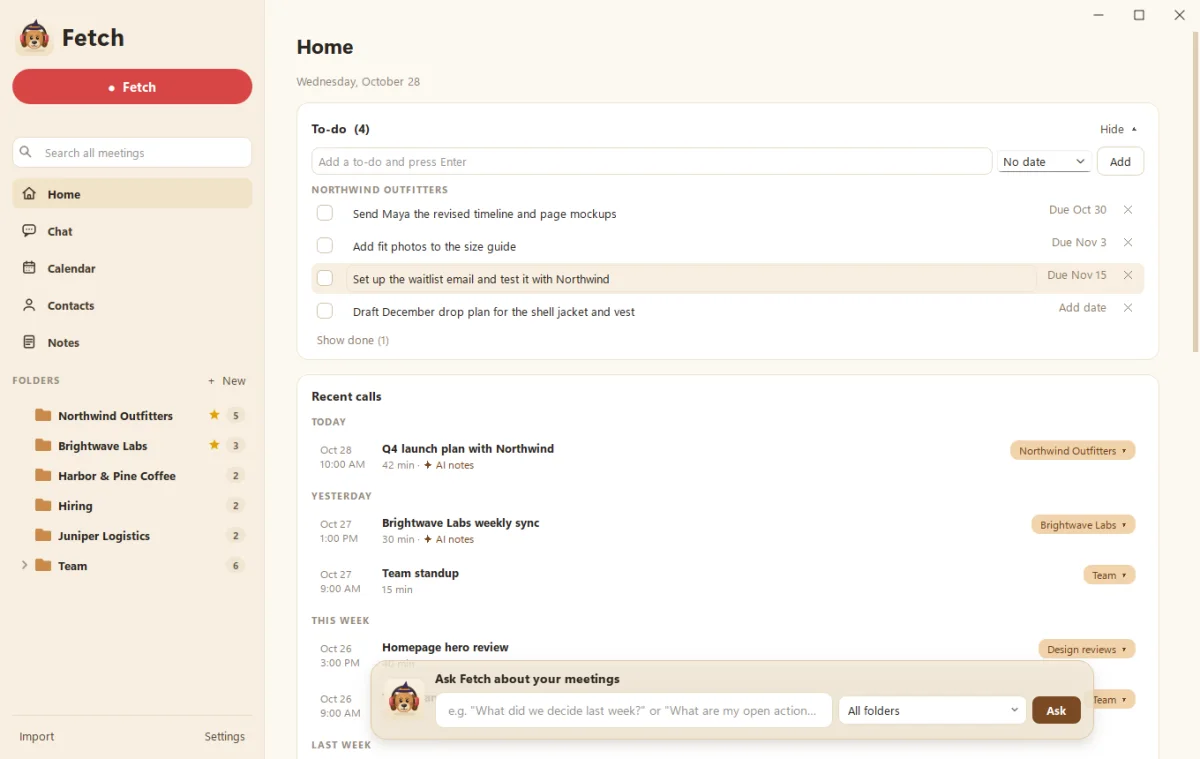
Fetch can answer questions about your meetings, like “What did we decide about the beta?” Ask from the Ask Fetch bar on Home, the Chat page, a single meeting’s Ask tab, or a folder. The answer comes back in plain words with a link to the call, and the exact moment, it came from.
Where can I ask?
| Where | What it searches | Good for |
|---|---|---|
| Ask Fetch bar on Home | All your calls | Quick questions |
| Chat page | All your calls, with follow-ups | Longer back-and-forth, past chats |
| A meeting’s Ask tab | That one call | “What did Priya say about pricing?” |
| A folder’s Notes page | Calls in that folder | Client or project questions |
What kinds of questions work well?
- Decisions: “What did we decide about the launch date?”
- Owners and dates: “Who’s writing the launch email, and when is it due?”
- History: “When did Northwind first ask about SSO?”
- Catch-up: “What happened in the design reviews this month?”
On the Chat page you can follow up with short questions like “Who owns that?” or “When is it due?” and Fetch keeps the thread. While it thinks, the dog fetches a stick. It’s very committed.
How do I check an answer?
Click the link in the answer to jump to that call and moment in the transcript. Trust, but verify. Even good dogs occasionally bring back the wrong stick.
Why can’t it answer?
- No AI connected. Ask needs Claude or ChatGPT. See Connect Claude or ChatGPT to Fetch.
- It wasn’t recorded. Ask only knows calls that are in Fetch. Bring older ones in with Import or from Granola.
- The transcript was deleted. Calls with only audio left can’t be searched. Re-transcribe them first (see Re-transcribe a meeting).
Is it private?
The search happens on your computer. Only the bits of text needed for the answer go to your own Claude or ChatGPT account. More on our Security page.
Questions people ask
Does Ask search my audio?
It searches the transcripts and notes on your computer, then sends the relevant text to your Claude or ChatGPT account to write the answer.
Can I see past chats?
Yes. The Chat page keeps your past conversations.
Still scratching your head?
Send us a note and a real person will get back to you.