Saved email receipts for business expenses
How Kibble saves a copy of each receipt email for business expenses you add from the Inbox, with the amount highlighted, for your tax records.
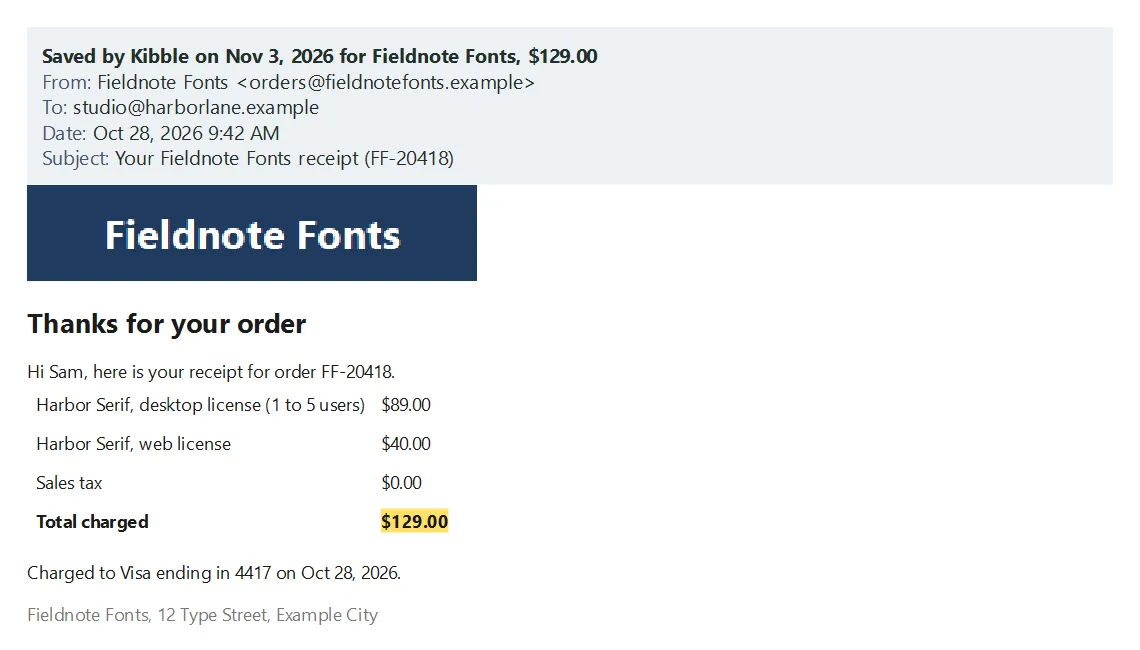
When you add a business expense from the Inbox, Kibble saves a copy of the email for your tax records. The copy shows the email as you got it, pictures included, with a strip on top saying who sent it, when, and what it’s for, and the charge amount highlighted. It’s attached to the expense and goes in your year-end ZIP. It’s a PDF unless you pick otherwise, and you can back it up to Google Drive.
What does a saved copy look like?
The strip on top says when Kibble saved it, the payee and the amount, then the email’s From, To, Date and Subject. Below that is the email itself, with the amount marked in yellow so it’s easy to spot.
When does Kibble save one?
Each time you click Add on a business charge in the Inbox (see Review your Inbox). Kibble opens the email again from Gmail in the background and saves the copy, so you can keep working.
The first time you open Kibble 1.1.1 or later, it also saves copies for the business expenses you already added from email, and lets you know when it’s done.
Where do I find it?
- On Expenses, the paperclip on the expense opens it.
- In the year-end ZIP on Taxes, with your other receipts (see 1099s and the year-end ZIP).
- On your computer, in Kibble’s receipts folder (see Where your data is stored).
How do I change the format or back it up?
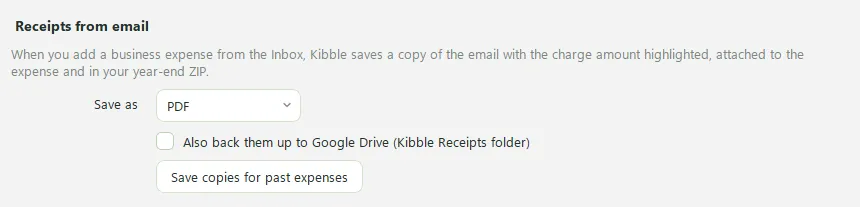
Open Settings > Business and find Receipts from email.
- Save as: PDF (the default, with text you can search), Picture (PNG), or Both.
- Also back them up to Google Drive: copies go to a Kibble Receipts folder in Google Drive, one folder per year. This needs Google Drive for desktop on your computer.
- Save copies for past expenses: saves a copy for any business expense from email that doesn’t have one yet.
Is this enough for the IRS?
A saved receipt email shows what you bought, from whom, when and how much, which is what the IRS asks you to keep for most expenses. For meals and travel, also note who you met and why it was for business. Kibble doesn’t give tax advice, so check with your accountant if you’re unsure.
Questions people ask
Does this happen for personal charges?
No. Only business expenses get a saved copy. Personal charges, refunds and client payments don't.
What if the email can't be opened again?
The expense is still added, with a link to the email as before. Click Save copies for past expenses in Settings > Business to try again for any that are missing.
Do the pictures in the email come from the internet?
Logos and product photos usually do, so Kibble downloads them when it saves the copy. That way the copy looks like the email you got.
Still scratching your head?
Send us a note and a real person will get back to you.