Export and import your data
How to export your Kibble budget and business as Excel or CSV files, with invoice PDFs and receipts, and import a Kibble export back in.
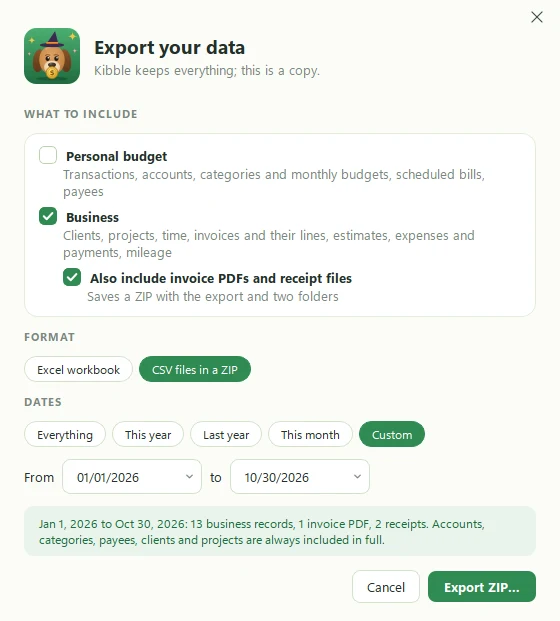
To get a copy of everything in Kibble, open Settings > General > Your data and click Export…. Pick your personal budget, your business or both, the dates, and Excel or CSV. To bring an export back in, on this computer or a new one, click Import a Kibble export… and Kibble adds only what’s missing.
What can I export?
- Personal budget: transactions, accounts, categories, monthly budgets, scheduled bills and payees.
- Business: clients, projects, time, invoices and their lines, estimates, expenses, payments and mileage.
- Files (optional): tick Also include invoice PDFs and receipt files, and Kibble saves a ZIP with the export plus a folder of each.
How do I pick the dates and format?
- When: Everything, This year, Last year, This month, or Custom dates.
- Format: one Excel workbook with a sheet for each kind of data, or CSV files in a ZIP.
Each sheet starts with easy-to-read columns. Kibble also keeps a copy of every row exactly as it stores it, in columns hidden in Excel, so an import gets every detail back.
How do I import a Kibble export?
- Open Settings > General > Your data.
- Click Import a Kibble export… and pick the file.
- Kibble shows, for each kind of data, what’s new and what’s already here.
- Confirm, and only the new items are added.
Nothing already in Kibble is changed or removed, so it’s safe to import the same file twice.
Can I use this to move to a new computer?
Yes. Export Everything with files on the old computer, install Kibble on the new one, and import the export. Then add your app passwords again in Settings > Email and Settings > Business, since passwords are never exported.
Is this the same as the year-end ZIP?
No. The year-end ZIP is a tax package for your accountant. An export is a full copy of your data that Kibble can read back in.
Questions people ask
Do I need Excel to open the export?
No. The workbook opens in Excel, Google Sheets, LibreOffice or Numbers. CSV files open almost anywhere.
Will importing an export create duplicates?
No. Kibble only adds what's missing, and never changes or removes anything that's already there.
Are my email or app passwords in the export?
No. Passwords stay in Windows' secure storage and are never exported.
Still scratching your head?
Send us a note and a real person will get back to you.