Employees and contractors
How to add W-2 employees and 1099 contractors in Kibble, see what each person really costs, and record payroll on your profit and loss.
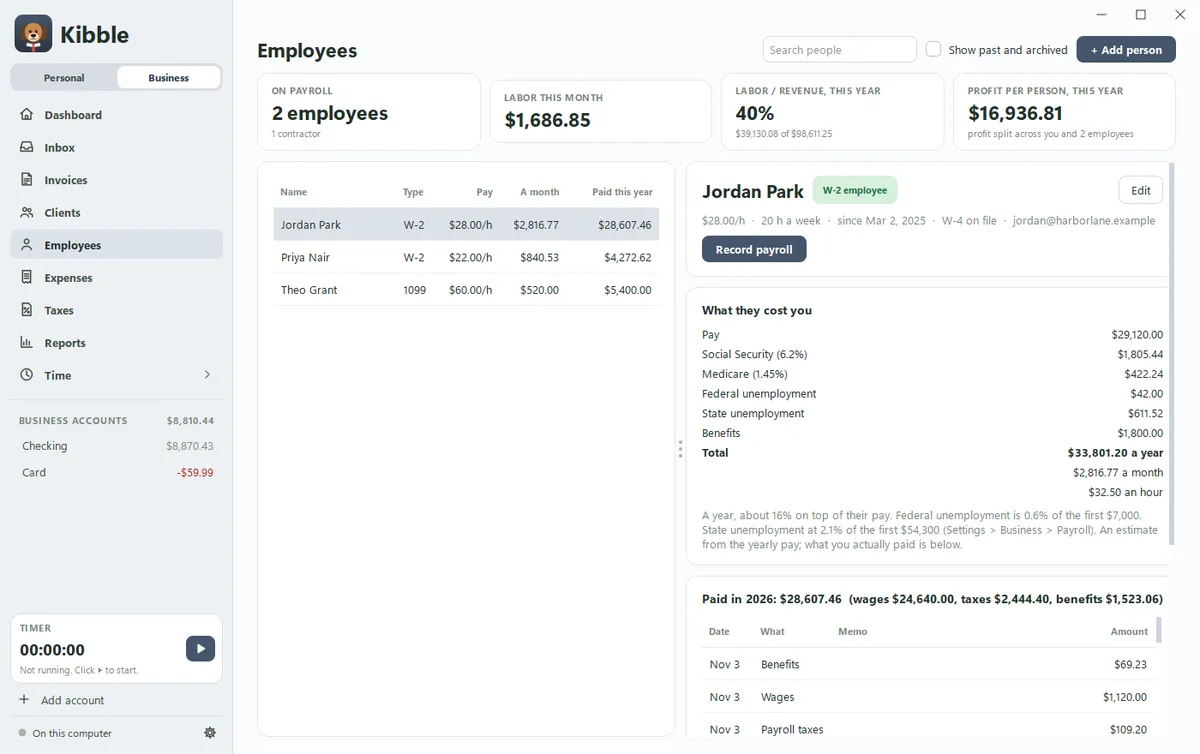
The Employees screen, right under Clients on the Business side, lists the people you pay: W-2 employees on payroll and 1099 contractors. For each one, Kibble shows what they really cost you, and Record payroll turns a payday into expenses on the right lines of your profit and loss. Kibble doesn’t run payroll or file anything. Your payroll service does that.
How do I add someone?
- Open Employees on the Business side and click + Add person.
- Type their name, and pick W-2 employee or 1099 contractor.
- Add their pay: a salary a year or an hourly rate with their usual hours, and how often they’re paid (every week, every 2 weeks, twice a month or once a month).
- Add any benefits you pay each month, like health insurance, and their start date.
- Tick W-4 on file or W-9 on file once you have it. You can add the last 4 digits of their tax ID, but no more.
When someone leaves, edit them and set the date under No longer works here, since. They drop off the list, and Show past and archived brings them back.
What does an employee really cost?
More than their pay. Pick a W-2 employee and Kibble adds up:
- Their pay
- Social Security (6.2%) and Medicare (1.45%), your share as the employer
- Federal unemployment: 0.6% of the first $7,000 of their pay each year
- State unemployment, at the rate your state gives you
- Benefits you pay
You see the total a year, a month and an hour, and how much it adds on top of their pay. Set your state’s unemployment rate and wage base in Settings > Business > Payroll. Your state sends you the rate each year.
A contractor costs what you pay them. There are no payroll taxes or benefits for a contractor.
How do I record payroll?
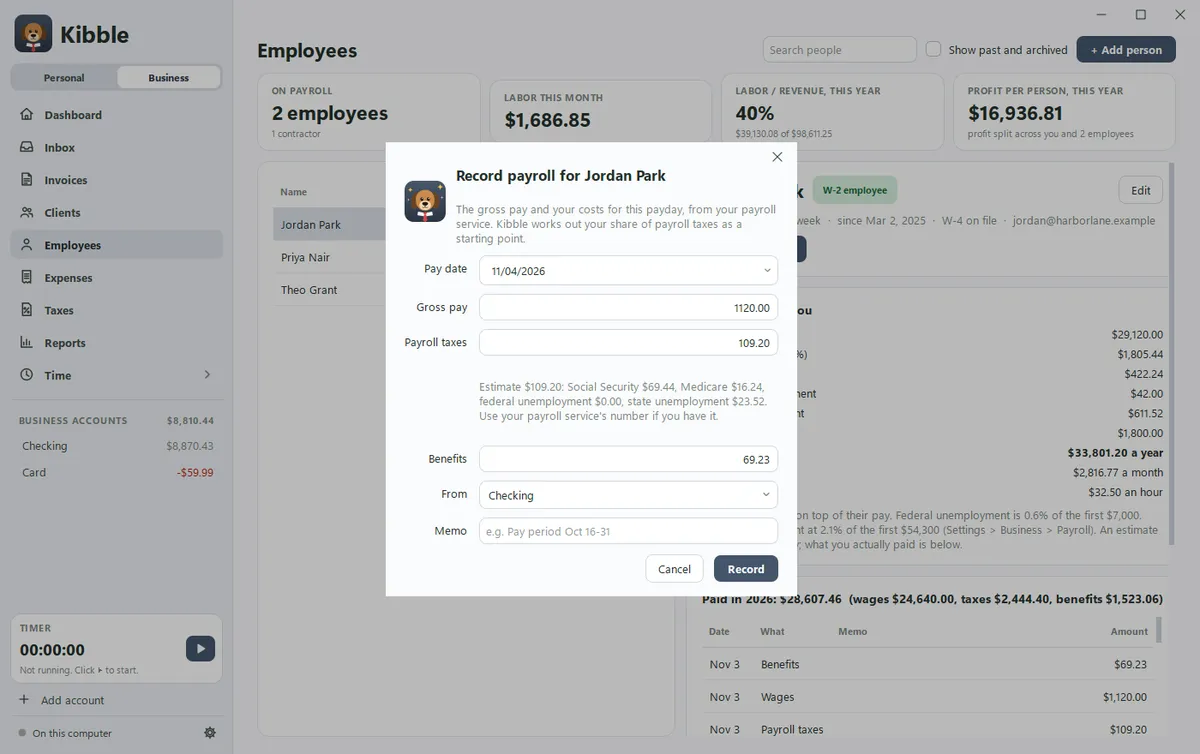
Pick the person and click Record payroll (for an employee) or Record a payment (for a contractor).
For an employee, Kibble fills in a regular paycheck and an estimate of your payroll taxes. Change the gross pay, payroll taxes and benefits to the numbers from your payroll service, pick the account it came from, and click Record. Kibble adds three expenses, each on its own Schedule C line:
| Part | Schedule C line |
|---|---|
| Wages | Line 26, Wages |
| Your payroll taxes | Line 23, Taxes and licenses |
| Benefits | Line 14, Employee benefit programs |
A contractor payment goes on Contract labor (line 11) and counts toward their 1099-NEC (see 1099s and the year-end ZIP).
Already paid someone and added it as an expense, from a bank statement or the Inbox? Open the person. If Kibble finds payments to that name, a Link payments already in Expenses button shows how many. Click it to link them to the person.
Where does payroll show up?
- The cards at the top of Employees: who’s on payroll, labor this month, labor as a share of revenue this year, and profit per person.
- Expenses and your profit and loss, on the lines above.
- Taxes: a Payroll card with wages and your payroll taxes for each quarter, and the date each quarterly Form 941 is due. Your payroll service usually files it, so this is a number to check against. The 1099 list follows your contractors and their W-9s (see Quarterly tax estimates).
- Reports: the Labor report shows wages, payroll taxes, benefits and contractors, labor as a share of revenue, profit per person, cost by person, and labor cost by client (see Business reports).
How do I see labor cost per client?
On the Time screen, each entry has a small button with initials for who did the work. It starts as you. Click it to pick someone from Employees. Kibble then uses that person’s hourly cost to show what each client costs you in labor, in the Labor report. See Track time with projects and tags.
Questions people ask
Does Kibble run payroll or work out withholding?
No. Your payroll service pays your people and works out what to hold back from each paycheck. Kibble records what each payday cost you, so your profit and loss is right.
Does Kibble keep Social Security numbers?
No. It keeps only the last 4 digits of a Social Security or tax ID number, so you can tell people apart.
What if I already added a contractor's payments as expenses?
Open the person on the Employees screen. If Kibble finds payments to that name, click Link payments already in Expenses to link them, and a contractor's payments move to Contract labor.
Is the payroll tax amount exact?
It's an estimate to start from. When you record a payday, type in the number from your payroll service if you have it.
Still scratching your head?
Send us a note and a real person will get back to you.