How to transcribe Microsoft Teams meetings offline
Keep the audio on your PC. Two ways to transcribe Teams calls locally, during the call or after.

To transcribe a Microsoft Teams meeting offline, use an app that turns speech into text on your own computer. You can do it live during the call, by recording your microphone and computer sound, or afterward, from a recording file. Either way, the audio never goes to a transcription service. Fetch does both on Windows.
“Offline” here means the transcription. The Teams call itself still needs internet. But once the audio is on your PC, a local speech model can turn it into text with the Wi-Fi off.
Why transcribe locally?
Teams can transcribe meetings in Microsoft’s cloud, and for many companies that’s fine. Local transcription makes sense when:
- Your organization turned transcription off, or only the organizer can start it.
- You’re not the organizer and can’t download the transcript.
- The conversation is sensitive, like legal, medical, HR or client matters, and you’d rather the audio stay on your machine.
- You want your own copy that doesn’t expire with a retention policy.
More on the trade-offs in Local vs cloud transcription.
Way 1: Transcribe live, during the call
- Install Fetch and let setup download a speech model. It picks one for your hardware.
- Leave Fetch running in the tray. When a Teams call starts, in the app or the browser, it starts recording, or asks first if you prefer.
- Watch the transcript appear as people talk. Your lines show as “Me”, everyone else’s as “Them”.
- When the call ends, a careful clean-up pass re-reads the audio and fixes names and mumbles.
The speech model runs on your PC, so this works the same with the network unplugged after the call. Only the optional AI notes use the internet, and they go to your own Claude or ChatGPT account as text, never audio.
Way 2: Transcribe a saved recording
Teams meeting recordings are saved to OneDrive or SharePoint. If you’re allowed to download the MP4:
- Download it to your PC.
- In Fetch, click Import and choose Recording.
- Check the title, date and folder, and click Import. Fetch writes the transcript on your PC.
Already have the Teams transcript as a .docx or .vtt file? Choose Transcript or Both instead. Fetch brings it in as a regular call you can search and ask about. See Import a recording or transcript.
Picking a speech model
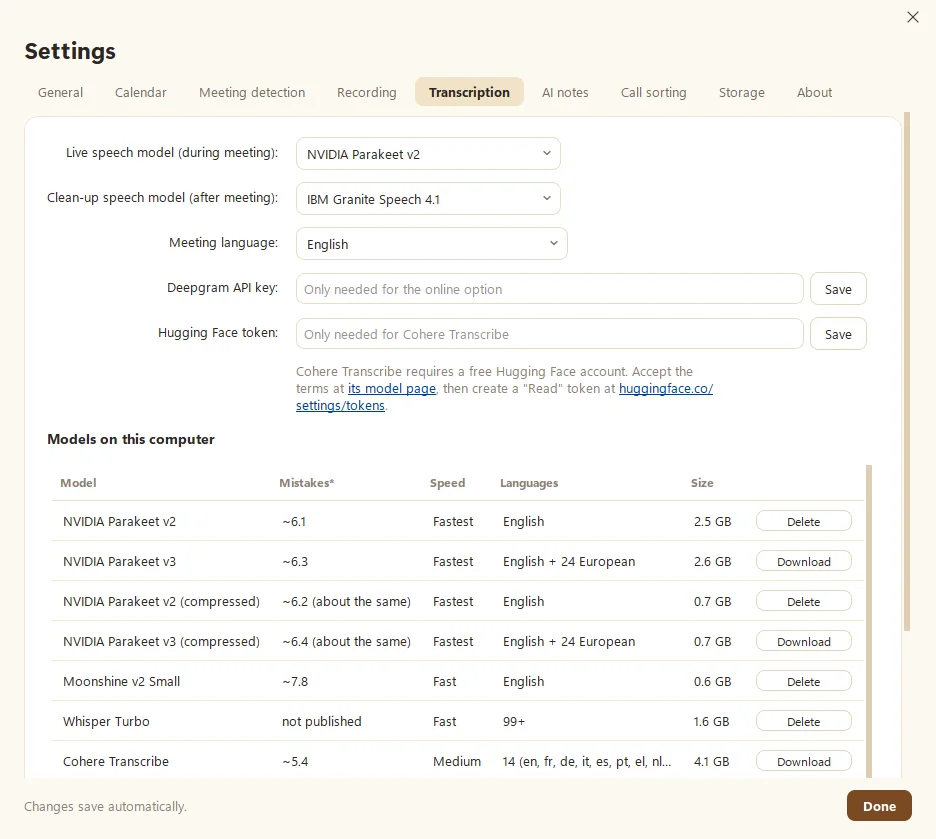
Speech-to-text models trade speed against accuracy:
- NVIDIA Parakeet v2 for fast, accurate English. The usual live pick.
- Parakeet v3 for English plus 24 European languages.
- Whisper for almost any language.
- IBM Granite Speech for the most careful clean-up pass.
Not sure? Record one meeting, then click Compare models in Fetch to read two transcripts side by side. See Choose a speech model.
Tips for a cleaner Teams transcript
- Use a headset, so the other side doesn’t echo into your mic.
- Set the meeting language if it isn’t English.
- Tell Fetch who a speaker is once. It fixes their lines and recognizes them next time.
- Let people know you’re transcribing. It’s polite, and in some places it’s the law.
The short version
- Teams’ own transcription runs in Microsoft’s cloud and depends on your organization’s settings.
- A local app can transcribe on your PC, live or from a recording, with no audio sent anywhere.
- Fetch does both on Windows, and adds AI notes with your own Claude or ChatGPT account if you want them.
Questions people ask
Can I transcribe a Teams meeting without internet?
The meeting itself needs internet. The transcription doesn't have to. A local app can turn the audio into text on your PC, during the call or later from a recording, even on a plane.
Does Teams have built-in transcription?
Yes. Teams can transcribe meetings in Microsoft's cloud when the organizer's settings allow it. Who can start it and download it depends on your organization's policies.
Which local speech model should I use?
For English, NVIDIA Parakeet is fast and accurate. For other languages, Whisper covers 99 or more. Fetch picks one for your hardware during setup.
Still scratching your head?
Send us a note and a real person will get back to you.