Automatic call detection (Zoom, Meet, Teams and Slack)
How Fetch notices Zoom, Google Meet, Microsoft Teams and Slack huddle calls, records them automatically, and knows when they end.
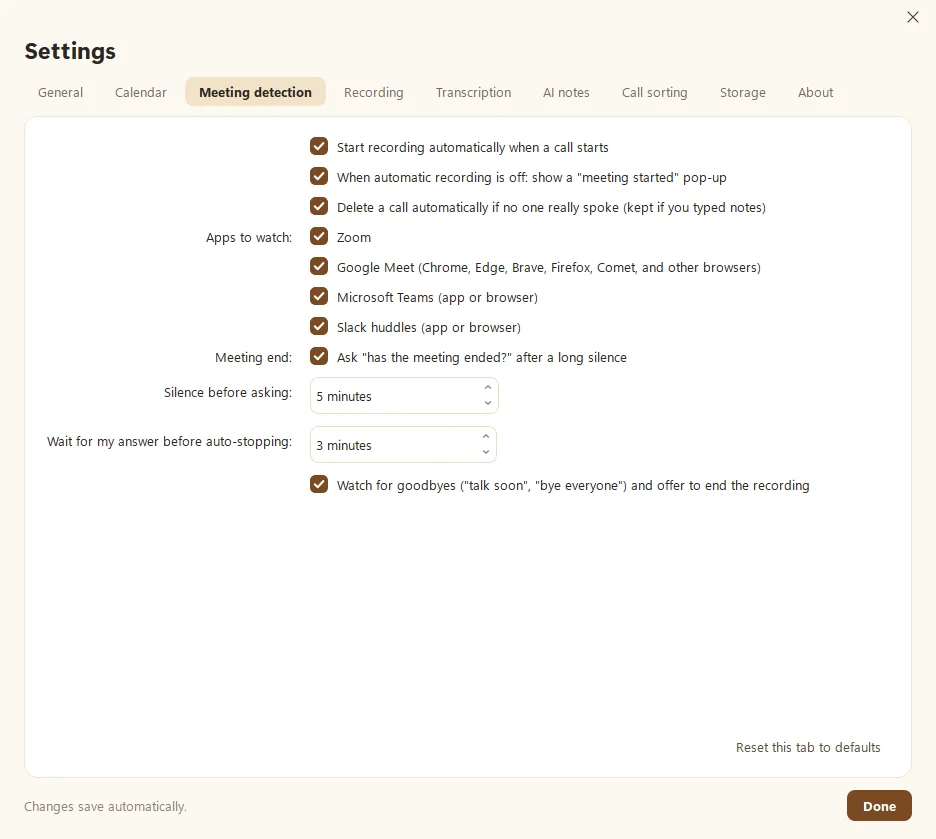
Fetch watches for Zoom, Google Meet, Microsoft Teams and Slack huddle calls while it sits in the tray. When one starts, it begins recording on its own, or pops up to ask if you prefer. You choose which apps it watches and how it behaves in Settings > Meeting detection.
How do I choose what Fetch does when a call starts?
In Settings > Meeting detection:
- Start recording automatically when a call starts. Hands-free. This is the default.
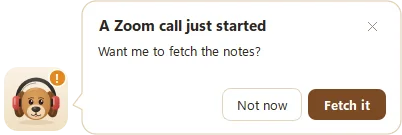
- When automatic recording is off: show a “meeting started” pop-up. You get a friendly “Want me to fetch the notes?” and one click to start.
If a call is already running when Fetch opens, it always asks first instead of starting on its own. No surprise recordings.
Which apps does it watch?
Tick or untick each one under Apps to watch:
- Zoom
- Google Meet in Chrome, Edge, Brave, Firefox, Comet and other browsers
- Microsoft Teams, app or browser
- Slack huddles, app or browser
For anything else, such as a phone on speaker or an in-person chat, press the red ● Fetch button. Fetch can also notice a call happening on another device in the room that only your microphone hears. That’s the Recording tab’s “Notice calls on another device” option.
How does Fetch know the call has ended?
- You click ■ Drop it, the simplest way.
- A long silence. After 5 minutes of quiet (you can change this), Fetch asks “has the meeting ended?” If you don’t answer within 3 minutes, it stops and saves on its own. Click Keep recording if it’s just a long pause.
- Goodbyes. Fetch listens for things like “talk soon” or “bye everyone” and offers to end the recording.
Can it start from my calendar instead?
Yes. With a calendar connected, turn on Start recording when a meeting with a video link begins in Settings > Calendar. See Connect your calendar.
Does Fetch need to be open?
It needs to be running, but not on screen. Leave it in the tray (see The tray icon and starting with Windows). If you quit Fetch, it can’t hear the doorbell.
Questions people ask
Does Fetch record calls without asking?
By default, yes, once you've set it up. It records automatically when a watched app starts a call. Turn that off in Settings > Meeting detection and it shows a "meeting started" pop-up instead.
Which browsers work for Google Meet?
Chrome, Edge, Brave, Firefox, Comet and other browsers.
Fetch didn't notice my call. Why?
Make sure Fetch is running in the tray, and that the app is ticked under Apps to watch. For anything else, like phone calls or other apps, just press the red record button.
Still scratching your head?
Send us a note and a real person will get back to you.