Briefings before your calls
How Fetch reminds you who's joining your next meeting a few minutes before it starts, and how to change the timing or turn it off.
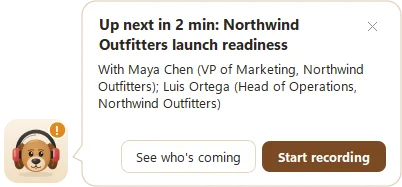
With a calendar connected, Fetch pops up shortly before each meeting with who’s coming: names, plus each person’s role or company if Fetch knows them. One click starts recording, and another opens the meeting on your calendar.
How do I turn briefings on?
- Connect a calendar (see Connect your calendar).
- Open Settings > Calendar.
- Make sure Show who’s coming shortly before a meeting is ticked. It’s on by default.
- Set How early, anywhere from 1 to 30 minutes before. The default is 2 minutes.
What’s in a briefing?
The pop-up says something like “Up next in 2 min: Customer call: Northwind”, followed by who’s on the invite. Fetch shows up to four people, with a short detail for anyone it knows, like their role or company. Then you get two buttons:
- Start recording. Fetch starts listening and opens its window.
- See who’s coming. Fetch opens the event on its Calendar page.
Where does “last time” come from?
Every time you record a call, Fetch learns a little about who was on it. Open a person in Contacts and you’ll see what you discussed last time, plus personal details picked up from the small talk at the start of calls. Asking “how was the trip to Lisbon?” beats “sorry, remind me what you do?” every time.
Can it just start recording instead?
Yes. Turn on Start recording when a meeting with a video link begins in Settings > Calendar, and Fetch starts on time without asking.
Why bother with a briefing?
Two minutes of context makes calls shorter and warmer. We wrote a whole post about it: Five minutes before every meeting: the briefing habit.
Questions people ask
Why didn't I get a briefing?
Briefings need a connected calendar and the meeting must be on it. Fetch also skips them while you're already recording another call.
Where does the extra info about people come from?
From Contacts. Fetch builds a profile for people on your calls, including their role, company, and small talk it picked up, like a new puppy or a recent trip.
Still scratching your head?
Send us a note and a real person will get back to you.