Connect Gmail, Calendar and Sheets
How to let Hunter watch Gmail for replies, add interviews to Google Calendar, and keep a Google Sheets copy of every application.
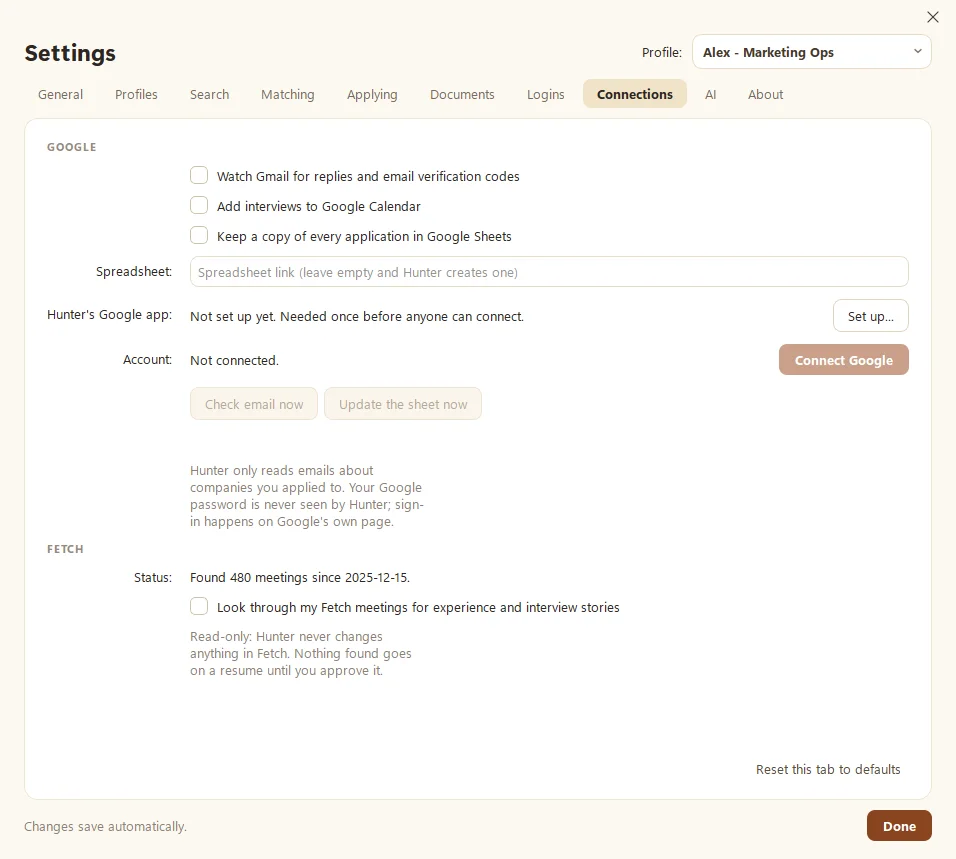
Hunter can keep your job hunt up to date from Google: it watches Gmail for replies and verification codes, adds interviews to Google Calendar, and keeps a copy of every application in Google Sheets. Turn on what you want in Settings > Connections, then click Connect Google. You sign in on Google’s own page, and Hunter never sees your password.
What does each option do?
- Watch Gmail for replies and email verification codes. Rejections, interview invites and offers update the matching application on their own. When a job site emails a code, Hunter reads it so the application can continue.
- Add interviews to Google Calendar, so they’re on your schedule with the right company and job, ready for a prep sheet.
- Keep a copy of every application in Google Sheets. Leave Spreadsheet empty and Hunter creates one, or paste a link to your own.
Each profile connects separately.
How do I connect?
- Open Settings > Connections.
- Tick the options you want under Google.
- Check Hunter’s Google app. If it says “Set up”, go to step 5.
- If it says “Not set up yet”, click Set up… and follow the steps below.
- Click Connect Google and sign in in your browser.
How do I set up Hunter’s Google app?
For now, this is a one-time step on each PC. It’s a bit technical, so put the kettle on:
- In Google Cloud, create a project.
- Turn on the Gmail, Google Calendar and Google Sheets APIs.
- Under Google Auth Platform, set the audience to External (testing) and add your email as a test user.
- Create an OAuth client of type Desktop app and download its JSON file.
- In Hunter, click Load JSON file… (or paste the client ID and secret) and click Save.
How do I check it’s working?
Click Check email now to read new replies right away, or Update the sheet now to refresh the spreadsheet. The message underneath shows what changed, or “No news about your applications.”
Is it private?
Hunter only reads emails about companies you applied to, and it does so from your own computer. Click Disconnect any time to stop. More on our Security page.
Questions people ask
Does Hunter read all my email?
No. It only reads emails about companies you applied to, plus verification codes job sites send.
Do I have to connect Google?
No, it's optional. Without it, update each application's stage yourself on the Applications page.
Why does it ask me to set up "Hunter's Google app"?
Google requires an app to be registered before it can read Gmail. For now, that's a one-time setup on each PC, shown step by step below.
Still scratching your head?
Send us a note and a real person will get back to you.