Kibble for side hustlers
A day job plus something on the side? Keep the side money separate, track the costs, and know what you owe.

A side hustle is great until tax season, when you realize the Etsy sales, tutoring and weekend photo shoots were all mixed into your regular spending. Kibble keeps the side money separate, tracks the costs that lower your taxes, and shows what you’ll owe, while your personal budget carries on next door.
Two sides, one app
Set Kibble to Both, and a Personal | Business switch appears at the top. Your day-job paycheck and everyday spending go into your zero-based personal budget. Side income and costs go to the business side, with their own accounts. When you move side money into your personal account, add it to your budget like any other income and give it a job. See Switch on Business mode.
Catch every side expense
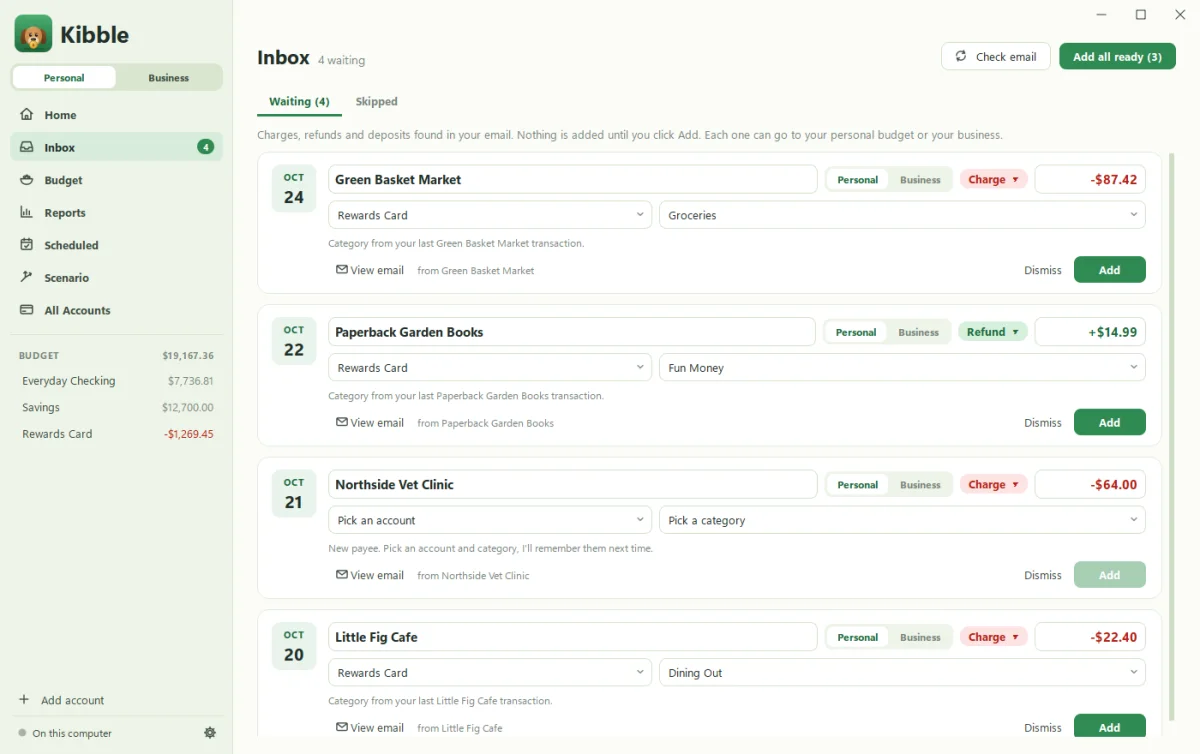
Supplies, shipping, platform fees, a share of your phone, the miles to a client’s house: they all lower the profit you pay tax on. Kibble finds receipts in your Gmail and asks Personal or Business? for each one, remembering the answer for each store. Business expenses get a Schedule C line. Log mileage at the 2026 IRS rate. See Review your Inbox.
Know what you’ll owe
Side income is usually taxed twice over: income tax on top of your salary, plus self-employment tax of about 15.3% on most of the profit once it reaches $400 for the year. Kibble’s Taxes screen estimates what to set aside from your real profit, and reminds you before each quarterly due date if you need to pay. Not sure whether you do? Try the quarterly tax calculator with your wages and withholding.
Invoices, if you need them
Tutoring, design, consulting or photography for clients? Send PDF invoices from your own Gmail, track hours, and let Kibble draft reminders when someone’s late. Selling on a marketplace instead? Skip invoices and just track income and expenses.
1099s in January
Platforms and clients may send you a 1099-NEC or other 1099 forms. Kibble lists clients who paid you $2,000 or more, so you can check their forms against your own records. At year end, one ZIP has everything your tax preparer needs.
What it costs
Kibble is free during early access, on Windows 10 and 11. Your books stay in a file on your PC, and Kibble never connects to your bank.
Questions people ask
Do I owe tax on a small side hustle?
Usually, yes. Self-employment tax generally applies once your net earnings reach $400 for the year, and the profit is added to your income. A tax professional can confirm your situation.
Do I need to pay quarterly taxes if I have a day job?
Maybe not. If your paycheck withholding covers enough of your total tax, you may not need estimated payments. Some people raise their withholding instead. Our quarterly tax calculator can help you check.
Can I use Kibble just for the side hustle?
Yes. Pick Business only in settings. Or pick Both to keep your personal budget and side business in one app, kept separate.
Still scratching your head?
Send us a note and a real person will get back to you.